

Virtual Network Computing (VNC) allows one to view and operate the console of another computer remotely accross the network. It is also known generically as RFB or Remote Frame Buffer. This tutorial will cover the use of a VNC client running on Linux to view and operate a Microsoft Windows desktop remotely.
Two versions of VNC are available:
- The original VNC developed by and available from AT&T (Britain)
Home page: http://www.realvnc.com/ - Tight VNC: Optimized and uses compression for use over slow networks.
Home page: http://www.tightvnc.com/
I noticed no speed advantage on a 100MBit/sec network. They seem to work identically. I fould that "RealVNC" and "Tight VNC" servers seemed to work at the same speed over a LAN (100MBps). The speed gain of Tight VNC is probably only noticeable over a low speed dial-up modem connection. I found that Tight VNC failed to repaint portions of the screen more often. (but probably uses less bandwidth.) It seems to be an annoying "feature" of both versions of VNC, to NOT repaint the screen sometimes when it is necessary. For this reason I find that Citrix Winframe (See: YoLinux tutorial on using the Citrix Linux client) or rDesktop (See: YoLinux tutorial on connecting to a MS/Windows computer via rDesktop) is a better solution for local high speed LANs.
The basic installation and configuration is so easy that this tutorial is not required by most Linux and Microsoft administrators. It installs and works!!
This tutorial shows how to display a Microsoft Windows Desktop on Linux (or any Unix X-Windows based system) If exporting an X-Windows desktop to another X-Windows based system, over a high speen LAN one should use native X-Windows. X-Windows is far more responsive. Use the X-Windows Xnest command to connect. (i.e. /usr/bin/X11/Xnest -query computer-node-name -geometry 1280x1024 :1) The story changes for a low speed connection where VNC's compression and low network resource load is preferable.
Linux VNC client Installation: The Linux client is available in source form (to be compiled), Red Hat RPM's from Red Hat and from the VNC web sites.
Installed Red Hat client RPMs:- vnc-3.3.3r2-39.i386.rpm
- vnc-doc-3.3.3r2-39.i386.rpm
Red Hat RPM's use TightVNC client.
Microsoft Windows VNC Server Installation: I tried installing both RealVNC and TightVNC. Installation is almost the same. The code base overlaps tremendously. Choose one:
- Windows 2000 "Real" VNC 3.3.6 Server:
Download x86 Win32 Full installation (server and viewer) Zip archive will unzip to an executable vnc-3.3.6-x86_win32.exe
Install:- Double click on vnc-3.3.6-x86_win32.exe from the file explorer.
- Dialog Box: This will install VNC. Do you wish to continue? - Select Yes
- Install wizard defaults instalation to: C:\Program Files\RealVNC
- Full installation. VNC Server
- Set up WinVNC: Default Local System Properties
Select a password.
Menu: "Start" + "RealVNC" + "VNC Server" + "Show Default Properties"
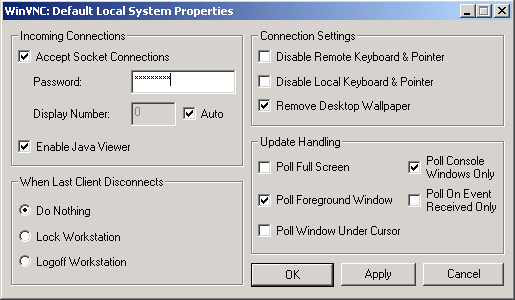
- Windows 2000 TightVNC Server installation:
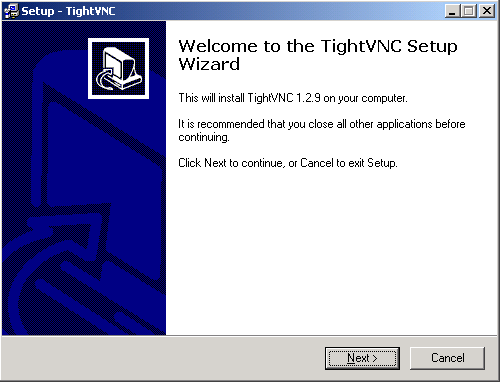
- Double click on tightvnc-1.2.9-setup.exe
- Install wizard begins. Installs to c:\Program Files\TightVNC by default
- Choose full installation + Next
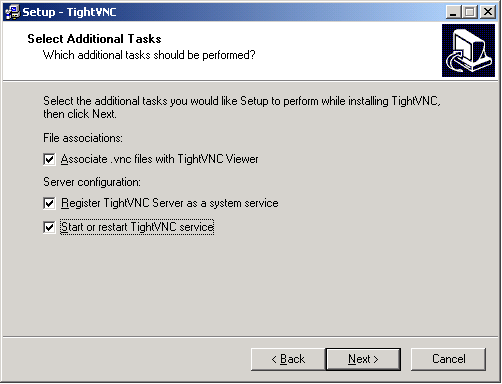
- Allows one to install to/select the menu heirarch.
- I selected the option to register TightVNC as a service and to start the service.
- "Start" + "Programs" + "TightVNC" + "Launch TightVNC Server"
Was already running due to installation wizard.
GUI Menu: "Start" + "RealVNC" + "VNC Server" + "Show Default Properties"
Set up WinVNC: Default Local System Properties and select a password.
Stop TightVNC server: "Start" + "TightVNC" + "Administration" + "Remove VNC Service"
Linux Client menu RH 8.0: "Start" + "Extras" + "Accessories" + "VNC Viewer"
or use the command: /usr/bin/vncviewer
- Querries for server: Name or IP
- Querries for password: (as configured during server installation.)
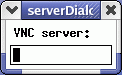
Client works with VNC and TightVNC.
Use F8 to view VNC client menu.Screenshot of a Microsoft Windows 2000 desktop displayed on Linux using VNC:
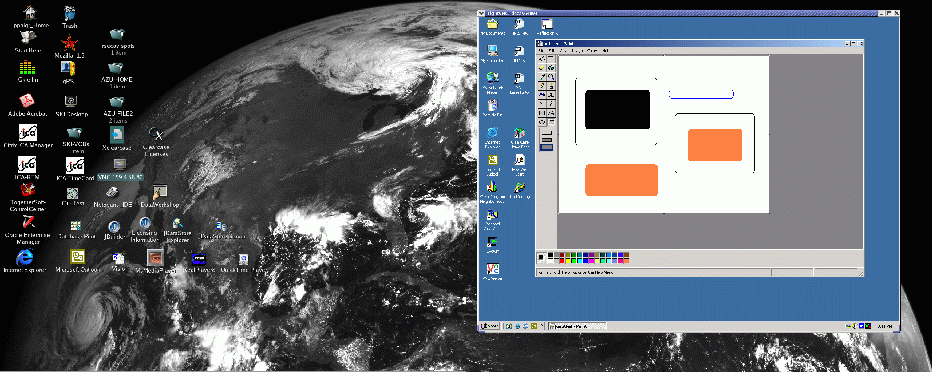
- VNC uses port 5900 by default
- Specifying a different port:
- Server: vncserver -rfbport port-number-to-use
- Client: vncviewer serverIP:port-number-to-use
RealVNC:
VNC Links:
- Linux Terminal Server Project: XDMCP query to server using standard X.
- Citrix
- rDesktop - Microsoft Windows RDP (Remote Desktop Protocol) Terminal Services client for Linux.
- Tarantella
- NX: Compressed (low bandwidth) X-Windows via an X proxy:
- FreeNX - free implementation of NX server
- NoMachine
- 2X.com:
- PXES: Thin client Linux distro for VNC, ICA, NX and rDesktop.
- Thinstation: Thin client Linux distro for VNC, ICA, NX and rDesktop.

