

Trac plugins are available to enhance Trac functionality. The plugins require some Python infrastructure for installation. Install the Python package "setuptools" which includes command "easy_install".
Red Hat/CentOS/Fedora installation: The "setuptools" package is available as an RPM on the installation DVD or via YUM: yum install python-setuptools
Debian/Ubuntu installation: apt-get install python-setuptools
Source installation: On older systems or distributions which do not include "setuptools", one can download and install it from source. The following is an example for Red Hat Enterprise 4 / CentOS 4. Use one of the following two methods to install the command "/usr/bin/easy_install":
- Python script:
- Download the Python script http://peak.telecommunity.com/dist/ez_setup.py
- Run: python ez_setup.py
This will download and run the script: setuptools-0.6c6-py2.3.egg which installs "easy_install".
- Egg script:
- Download: http://cheeseshop.python.org/packages/2.4/s/setuptools/setuptools-0.6c6-py2.4.egg
- As root: chmod +x setuptools-0.6c6-py2.3.egg
- Run: ./setuptools-0.6c6-py2.3.egg
Documentation:
List Trac plugins installed: Select "Admin" tab + "Plugins"
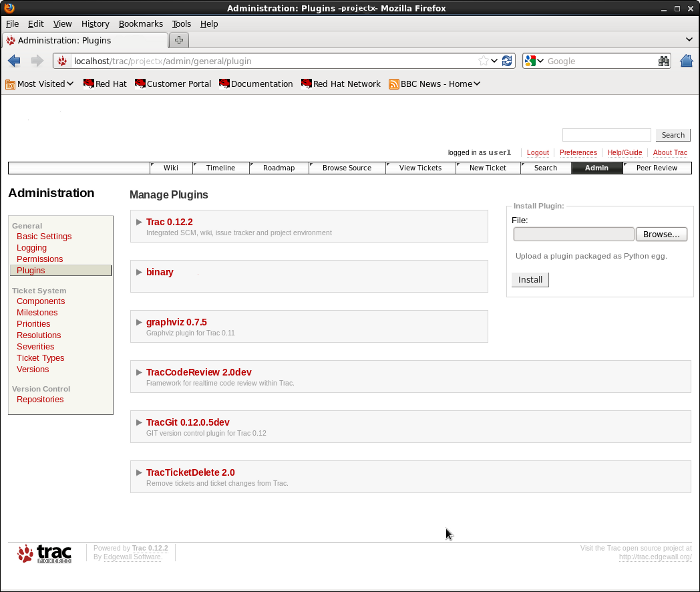
This plugin for Trac will render graphviz drawings within a Trac wiki or ticket page.
Installation: Use the command: easy_install http://trac-hacks.org/svn/graphvizplugin/0.13Uses subversion. If required, set the proxy in your Subversion config file: ~/.subversion/servers
[global]
http-proxy-host = proxy.megacorp.com
http-proxy-port = 80
Install prerequisites:
Requires Graphviz RPMs and dependencies: http://www.graphviz.org/Download_linux_rhel.php- graphviz
Graphviz dependencies (I installed both the i686 and x86_64 packages):- gtkglarea
- gtkglarea2
- gtkglarea2-devel
- gtkglext-libs (RHEL6.1+ http://rpm.pbone.net/index.php3/stat/4/idpl/17458912/dir/centos_6/com/gtkglext-libs-1.2.0-11.el6.x86_64.rpm.html)
- freeglut (http://rpm.pbone.net/index.php3/stat/4/idpl/15160534/dir/redhat_el_6/com/freeglut-2.4.0-9.el6.x86_64.rpm.html)
- graphviz-devel
- graphviz-doc
- graphviz-gd
- graphviz-graphs
- graphviz-perl
- graphviz-python
- graphviz-tcl
- webdot
- gts
- gts-devel
- mod_python (Fast CGI for Python: Apache WSGI)
- python-clearsilver
Configuration:
Add the following to the Trac configuration file: /srv/trac/projectx/conf/trac.ini
...

[graphviz]
cache_dir = /tmp/trac
cache_manager = yes

[components]
graphviz.* = enabled

...
Upgrade and restart:
- trac-admin /srv/trac/projectx upgrade
- service httpd restart
[Potential Pitfall]: You may get an error during operation due to a lack of access to /tmp/trac
Fix:mkdir /tmp/trac chown apache.apache /tmp/tracIf the system removes this directory periodically, this may have to be added to a cron job.
Add the following cron job file: /etc/cron.daily/trac-fix
#! /bin/sh
# Cron sjobs clean-up /tmp and delete a required
# directory for the Trac peer review plugin
if [ ! -d /tmp/trac ]; then
mkdir /tmp/trac
chown apache.apache /tmp/trac
fi
Example of use:
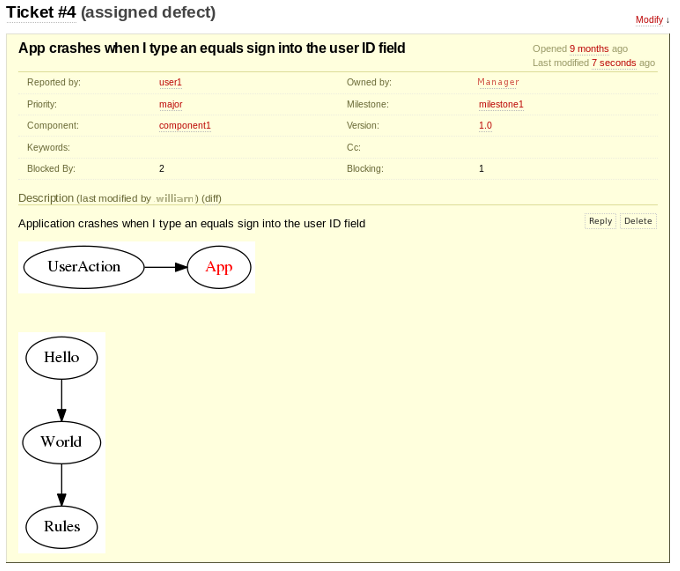
Enter in Trac wiki markup within a Trac wiki page or Trac ticket posting:
...

{{{
#!graphviz
  digraph G {
    rankdir = "LR"
    UserAction [ URL=UserActionWikiPage ]
    App [
      URL="http://www.yolinux.com/"
      fontcolor=red
    ]
    UserAction -> App
    }
}}}

[[BR]]

{{{
#!graphviz
digraph G {Hello->World->Rules}
}}}

...
Note:
- The URL spacifies the link for the text "UserAction" and "App". The URL UserActionWikiPage is the typical Trac camelcase link within Trac wiki markup to another wiki page.
- The specification of "LR" is Left to Right. Default is vertical, top to bottom.
Displays in Trac ticket page as:
Installation:
- RPM package: (Red Hat/CentOS):
Plugin available as an RPM packages from Extra Packages for Enterprise Linux (EPEL)Install: rpm -ivh trac-mastertickets-plugin-xxxx.rpm
or
- Install from source:
Download the MasterTickets source (Subversion) or MasterTickets on GitHub or by selecting the GitHub zip file link.$ unzip trac-mastertickets-master.zip $ cd trac-mastertickets-master $ python setup.py bdist_egg $ sudo easy_install dist/TracMasterTickets-3.0.3-py2.6.egg Processing TracMasterTickets-3.0.3-py2.6.egg creating /usr/lib/python2.6/site-packages/TracMasterTickets-3.0.3-py2.6.egg Extracting TracMasterTickets-3.0.3-py2.6.egg to /usr/lib/python2.6/site-packages Adding TracMasterTickets 3.0.3 to easy-install.pth file Installed /usr/lib/python2.6/site-packages/TracMasterTickets-3.0.3-py2.6.egg Processing dependencies for TracMasterTickets==3.0.3 Finished processing dependencies for TracMasterTickets==3.0.3
A consequence of installing the "Graphviz" plugin is that all of the graphviz pre-requisites are also installed. The "Graphviz" plugin is not required or used by the "master tickets" plugin. If Graphviz and the dot command are not installed, install the following Linux packages:
Requires Graphviz RPMs and dependencies: http://www.graphviz.org/Download_linux_rhel.php- graphviz
Graphviz dependencies (I installed both the i686 and x86_64 packages):- gtkglarea
- gtkglarea2
- gtkglarea2-devel
- gtkglext-libs (RHEL6.1+ http://rpm.pbone.net/index.php3/stat/4/idpl/17458912/dir/centos_6/com/gtkglext-libs-1.2.0-11.el6.x86_64.rpm.html)
- freeglut (http://rpm.pbone.net/index.php3/stat/4/idpl/15160534/dir/redhat_el_6/com/freeglut-2.4.0-9.el6.x86_64.rpm.html)
- graphviz-devel
- graphviz-doc
- graphviz-gd
- graphviz-graphs
- graphviz-perl
- graphviz-python
- graphviz-tcl
- webdot
- gts
- gts-devel
- mod_python (Fast CGI for Python: Apache WSGI)
- python-clearsilver
Configuration:
Master ticket plugin:
Add the following to the Trac configuration file: /srv/trac/projectx/conf/trac.ini
...

[mastertickets]
dot_path = /usr/bin/dot
graph_direction = TD

[ticket-custom]
blocking = text
blocking.label = Blocking
blockedby = text
blockedby.label = Blocked By

[graphviz]
cache_dir = /tmp/trac
cache_manager = yes

[components]
mastertickets.* = enabled
graphviz.* = enabled

...
- TD = Top Down
- DT = Down Top
- LR = Left Right
- RL = Right Left
Upgrade and restart:
- trac-admin /srv/trac/projectx upgrade
- trac-admin /srv/trac/projectx wiki upgrade
- sudo service httpd restart
Note that the Agile plug-in Agilo breaks operation of this plug-in.
Usage:
- Assign/Define ticket dependency (blocking/blocked by):
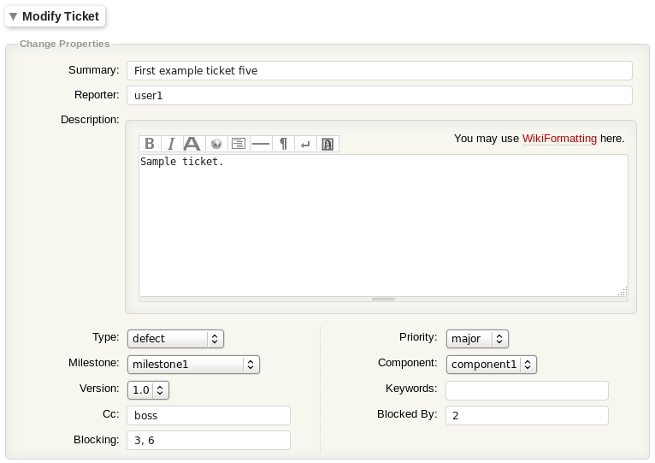
- View ticket:
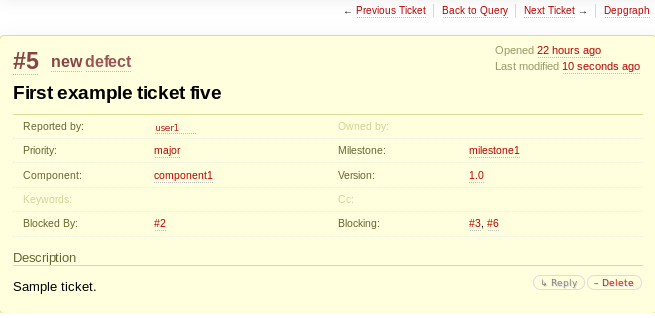
- Show ticket dependency graph: (select "Depgraph" link in upper right corner):
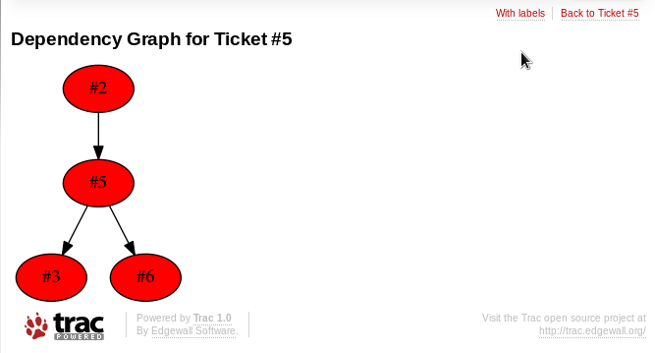
Dependancy graph color codes:- Green: ticket is completed
- Red: ticket not complete
- Grey: ticket not part of dependency chain
Installation:
Red Hat: available as RPM packages from Extra Packages for Enterprise Linux (EPEL)
Red Hat/CentOS/Fedora install: rpm -ivh trac-peerreview-plugin
Mint/Ubuntu/Debian: apt-get install trac-mastertickets trac-graphviz
Configuration:-
Add the following to the Trac configuration file:
/srv/trac/projectx/conf/trac.ini
Upgrade and restart:
...

[components]
codereview.* = enabled

...
- trac-admin /srv/trac/projectx upgrade
- trac-admin /srv/trac/projectx wiki upgrade
- service httpd restart
- trac-admin /srv/trac/projectx permission add user1 CODE_REVIEW_MGR
(or for users CODE_REVIEW_DEV)
Note that the Agile plug-in Agilo breaks operation of this plug-ins.
This will no longer be required with Trac version 0.10 or later as it will be integrated into the Trac.
Installation:
- Use Subversion to download latest webadmin plugin software:
svn export http://svn.edgewall.com/repos/trac/sandbox/webadmin/
This will create the directory webadmin/ and its contents. - cd webadmin
- Install Trac plugin: easyinstall .
If installing from an egg file:
- mv TracWebAdmin-0.1.2dev_r4240-py2.3.egg.zip TracWebAdmin-0.1.2dev_r4240-py2.3.egg
- easy_install TracWebAdmin-0.1.2dev_r4240-py2.3.egg
Direct Trac to employ the component "webadmin". Add to end of file: /srv/trac/ProjectX/conf/trac.ini
...
..


[components]
webadmin.* = enabled
Apache configuration modification. File: /etc/httpd/conf.d/trac.conf
<Location "/trac">
        SetEnv TRAC_ENV "/srv/trac/projectX"
        SetEnv PYTHON_EGG_CACHE /srv/trac/projectX/egg_cache

...
..
</Location>
- mkdir /srv/trac/ProjectX/egg_cache
- chown apache.apache /srv/trac/ProjectX/egg_cache
Restart apache: service httpd restart
Test to see if plugin has been installed: python -c "import webadmin"
The proper response is no output. Error response: "ImportError: No module named webadmin"
The final step is to add the Trac administrator privileges:
trac-admin /srv/trac/ProjectX permission add user1 TRAC_ADMIN
Users who have been given "TRAC_ADMIN" privileges, will see an extra tab in the Trac toolbar interface labeled "Admin". Select this tab to access the "webadmin" interface to Trac. This interface will allow you to create components, associate components with roadmaps, etc.
- Trac home page
- Trac-Hacks - plugins, macros, scripts and patches for enhanced capability.
- Trac plugin list
- YoLinux.com Subversion and Trac tutorial - lots of Trac administration information. Hosting multiple Trac projects, etc.
- YoLinux.com Git and Trac tutorial - installation and configuration
- YoLinux.com Trac wiki markup
 Books:
 |
Defect Tracking Tools Product Comparison Guide: Large Enterprise Edition
TiPS-IT Ziff Davis Media Digital PDF Download
|

|
 |
Defect Tracking Tools Product Comparison Guide: Small / Mid Enterprise Edition
TiPS-IT Ziff Davis Media Digital PDF Download
|
|