

The XmlBeansxx program and process is a C++ code generation program driven by an XSD XML schema definition. XmlBeansxx can read an XSD schema definition and auto-generate C++ classes to parse and access an XML file which meets the schema definition. The very same classes can also be used to generate XML conforming to the XSD schema. XmlBeansxx will generate C++ classes and provide a library which can be compiled in or linked into your C++ program. There are functions in these classes which can be used to obtain values from a parsed XML file or to generate an XML file. XML validation is optional.
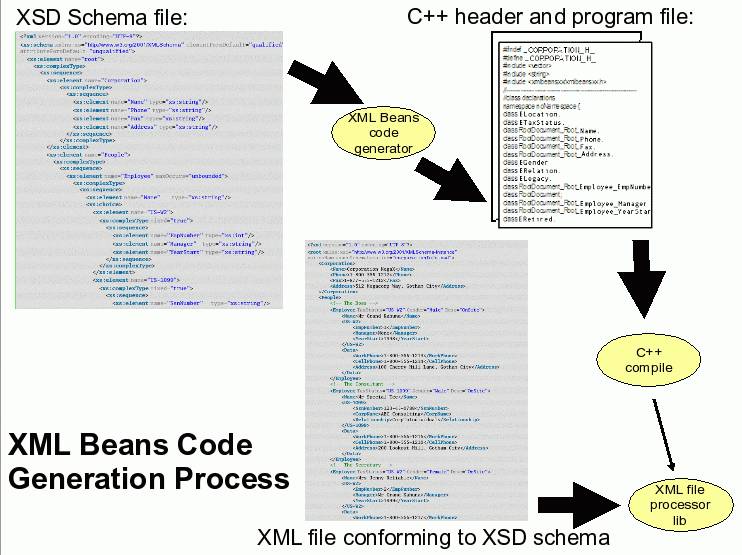
XML marshalling and unmarshalling utilizing XML Beans generated C++ classes
Prerequisites:
- autoconf and automake (or cmake)
- RHEL5 (autoconf: 2.59, automake: 1.9.6): yum install autoconf automake
- Ubuntu 8.10 (autoconf: 2.61, automake: 1.10): apt-get install autoconf automake
- Ubuntu 12.04 (autoconf: 2.68, automake: 1.11.3): apt-get install autoconf automake
- libtool:
- RHEL5 (libtool: 1.5.22): yum install libtool
(So old it leads to problems! See pitfalls below) - Ubuntu 8.10 (libtool: 2.2.4): apt-get install libtool
- Ubuntu 12.04 (libtool: 2.4.2): apt-get install libtool
- RHEL5 (libtool: 1.5.22): yum install libtool
- gmp (http://gmplib.org/)
- RHEL5 (gmp 4.1.4): yum install gmp gmp-devel
- Ubuntu 8.10 (libgmpxx4 4.2.2, libgmp3-dev: 4.2.2): sudo apt-get install libgmpxx4 libgmp3-dev
- Ubuntu 12.04 (libgmpxx4ldbl 5.0.2, libgmp3-dev: 5.0.2): sudo apt-get install libgmpxx4ldbl libgmp3-dev
- boost and boost-devel
- RHEL6 (boost: 1.41.0): yum install boost boost-devel boost-test boost-date-time boost-thread boost-system boost-signals boost-filesystem boost-regex boost-program-options boost-wave boost-graph boost-python boost-serialization boost-iostreams
- RHEL5 (boost: 1.33.1): yum install boost boost-devel
- Ubuntu 8.10 (libboost-dev: 1.34.1): sudo apt-get install libboost-dev
- Ubuntu 12.04 (libboost-dev: 1.48.0.2): sudo apt-get install libboost-date-time1.48.0
sudo ln -s /usr/lib/libboost_date_time.so.1.48.0 /usr/lib/libboost_date_time.so
sudo apt-get install libboost-all-dev
sudo ldconfig (this registers the library to the linker environment)
- xerces-c: See the YoLInux.com Xerces-C 2.7.0 tutorial (Note that XmlBeansxx 0.9.8 works with Xerces-C 2.7.0 (and even 2.8) but not with Xerces-C 3.0.1 or anything later than 2.8)
- RHEL5: Download source, compile and generate RPMs for installation: rpmbuild -ta xerces-c-2.7.0.tar.gz
(Use RPMs as they install to /usr - required as XmlBeansxx does not allow one to specify an alternate path for Xerces)
Also available for RHEL5 as an RPM from EPEL. - Ubuntu: Compile from source and install to /usr
you are probably using the wrong version of xerces (paths were changed). Use Xerces-c 2.7 or 2.8. - RHEL5: Download source, compile and generate RPMs for installation: rpmbuild -ta xerces-c-2.7.0.tar.gz
- Install Java (1.4.0+ including 1.6): (XmlBeans code generation requires Java and the Maven build tool is a Java program)
See the YoLinux Java installation tutorial - Install Maven (untar Java jar files. Java program and thus platform independent)
(Called by XmlBeans configure script and Makefile)- Download compiled Java program: http://maven.apache.org/download.html
- cd /opt
- wget http://apache.opensourceresources.org/maven/binaries/apache-maven-2.2.1-bin.tar.gz
- tar xzf apache-maven-2.2.1-bin.tar.gz
This creates /opt/apache-maven-2.2.1 - Configuration:
- Add path to shell environment: export PATH=$PATH:/opt/apache-maven-2.2.1/bin
This allows execution of the Maven build command mvn - If using a proxy, edit /opt/apache-maven-2.2.1/conf/settings.xml
Set proxy: <proxies> <proxy> ...
- Add path to shell environment: export PATH=$PATH:/opt/apache-maven-2.2.1/bin
- Add mvn to path: export PATH=$PATH:/opt/apache-maven-2.2.1/bin
Ubuntu/Debian Note: Maven can also be installed using apt-get: sudo apt-get install maven2 - Log4cxx is an optional prerequisite (Version 0.9.7) See the YoLinux.com Log4cxx tutorial for Red Hat Enterprise Linux 5 (RHEL5) prerequisites and build instructions. Note that XmlBeansxx requires that Log4cxx be installed to /usr and is not recognized by the XmlBeans build in any other location such as /opt or /usr/local.
Build and install:
- Build and install Log4cxx to /usr (See the Log4cxx tutorial)
- Download xmlbeansxx-0.9.8.tar.gz
- tar xzf xmlbeansxx-0.9.8.tar.gz
- cd xmlbeansxx-0.9.8
- ./bootstrap
[Potential Pitfall]: CppUnit errors+ mkdir -p config m4 + aclocal -I m4 configure.ac:36: warning: macro `AM_PATH_CPPUNIT' not found in library + autoheader + libtoolize --automake --copy + automake --foreign --add-missing --copy tests/Makefile.am:7: HAVE_CPPUNIT does not appear in AM_CONDITIONAL + autoconf
Fix by installing cppunit and cppunit-devel packages (RPMs) - ./configure --prefix=/usr --disable-log4cxx (or with log4cxx if you plan to use its' logging facility.)
Typically I would specify /opt or /usr/local but execution of xmlbeansxx scompxx command requires /usr in order to function. (As Far As I Can Tell)
[Potential Pitfall]: RHEL6.3 configure boost error:... checking for main in -lboost_thread... no configure: error: boost_thread library not found. Please install it.Check dependency: rpm -qa|grep boost-thread
boost-thread-1.41.0-11.el6_1.2.x86_64
boost-thread-1.41.0-11.el6_1.2.i686
Note that the libraries are now named:
/usr/lib/libboost_thread-mt.so.5
/usr/lib64/libboost_thread-mt.so
/usr/lib64/libboost_thread-mt.so.5
Thus edit the file xmlbeansxx-0.9.8/configure: Edit lines 16758 and 16816 from:
LIBS="-lboost_thread $LIBS"
to:
LIBS="-lboost_thread-mt $LIBS" - make
[Potential Pitfall]: RHEL5: If you get the error (and you will):../../libtool: line 466: CDPATH: command not found ../../libtool: line 1144: func_opt_split: command not foundThis due to the file ./libtool which is created by ./configure is for the newer version of libtool 2.2.4 while RHEL5 has libtool version 1.5.22 /usr/bin/libtool which does not have these functions.
Thus fix by:- mv libtool NoGood-libtool
- ln -s /usr/bin/libtool ./
Note Ubuntu 8.10 uses libtool 2.2.4 and does not have this problem. - make check
This requires cppunit to be installed before executing "configure".
(Note: "CalendarTest" failed for me, the rest was Ok)
[Potential Pitfall]: Library errorxmlbeansxx-0.9.8/tests/.libs/lt-XXXTest: error while loading shared libraries: liblog4cxx.so.10: cannot open shared object file: No such file or directory
Fix: Register the newly generated libraries with the command (as root): ldconfig -n /usr/lib - make install
Installs to /usr/include/xmlbeansxx/, /usr/lib, /usr/bin and /usr/share/xmlbeansxx/ for configure "--prefix=/usr".
[Potential Pitfall]: not all files installed (RHEL6)cd src/xmlbeansxx
sudo /usr/bin/install -c -m 644 configLibxml2.h configLog4cxx.h configGmpxx.h XmlTypesGen.h xml-fragment.h '/usr/include/xmlbeansxx'
Links:
- XMLBeans/C++ - Apache xmlbeanscxx Home Page
- download (Sourceforge)
The first example is using a variation of the Apache XML Beans sample XSD and XML
The second is our own YoLinux.com example using a more complex XSD and XmlBeansxx compiled with Log4cxx.
The third example generates XML which complies to an XSD.
The following schema example is based on the Apache XML Beans example.
File: EasyPO.xsd
<!--
Copyright 2004 The Apache Software Foundation

Licensed under the Apache License, Version 2.0 (the "License");
you may not use this file except in compliance with the License.
You may obtain a copy of the License at

http://www.apache.org/licenses/LICENSE-2.0

Unless required by applicable law or agreed to in writing, software
distributed under the License is distributed on an "AS IS" BASIS,
WITHOUT WARRANTIES OR CONDITIONS OF ANY KIND, either express or implied.
See the License for the specific language governing permissions and
limitations under the License.
 -->
<xs:schema
targetNamespace="http://xmlbeans.apache.org/samples/enumeration/schemaenum/easypo"
    xmlns:xs="http://www.w3.org/2001/XMLSchema"
    xmlns:po="http://xmlbeans.apache.org/samples/enumeration/schemaenum/easypo"
    elementFormDefault="qualified">
    <xs:element name="purchase-order">
        <xs:complexType>
            <xs:sequence>
                <xs:element name="customer" type="po:customer"/>
                <xs:element name="date" type="xs:dateTime" />
                <xs:element name="line-item" type="po:line-item" minOccurs="0" maxOccurs="unbounded"/>
                <xs:element name="shipper" type="po:shipper" minOccurs="0"/>
            </xs:sequence>
        </xs:complexType>
    </xs:element>
    <xs:complexType name="customer">
        <xs:sequence>
            <xs:element name="name" type="xs:string"/>
            <xs:element name="address" type="xs:string"/>
        </xs:sequence>
    </xs:complexType>
    <xs:complexType name="line-item">
        <xs:sequence>
            <xs:element name="description" type="xs:string"/>
            <xs:element name="per-unit-ounces" type="xs:decimal"/>
            <xs:element name="price" type="xs:double"/>
            <xs:element name="quantity" type="xs:int"/>
        </xs:sequence>
    </xs:complexType>
    <xs:complexType name="shipper">
        <xs:sequence>
            <xs:element name="name" type="xs:string"/>
            <xs:element name="per-ounce-rate" type="xs:decimal"/>
        </xs:sequence>
    </xs:complexType>
</xs:schema>
Note:
- The "xs:" prefix refers to XML built-in type definitions defined by the w3.org (World Wide Web consortium).
- The "po:" prefix refers to "Purchase Order" schema defined by the enumerations in http://xmlbeans.apache.org/samples/enumeration/schemaenum/easypo
Generate C++ classes from XSD: /usr/bin/scompxx EasyPO.xsd
[Potential Pitfall]: scompxx on RHEL6 runtime error:
libtoolize: `COPYING.LIB' not found in `/usr/share/libtool/libltdl'
The scompxx command is a bash shell script which performs many operations including the generation and execution of a configure script. This error can be fixed by installing two packages not included with the RHEL6.3 workstation DVD but can be found on pkgs.org as CentOS RPM packages:
- libtool-ltdl-devel-2.2.6-15.5.el6.x86_64.rpm
- libtool-ltdl-devel-2.2.6-15.5.el6.i686.rpm
File: testEasyPO.cpp
#include "EasyPO.h"
#include <iostream>
#include <fstream>

using namespace std;
using namespace xmlbeansxx;
using namespace xmlbeansxx::samples::enumeration::schemaenum::easypo;

int main() {

    try {
        fstream in("easypo.xml", ios::in);
        PurchaseOrderDocument pDoc(PurchaseOrderDocument::Factory::parse(in));

        xmlbeansxx::XmlOptions opts;
        opts.setValidation(true);

        vector<LineItem> arr = pDoc.getPurchaseOrder().getLineItemArray();
        for(int i=0; i < arr.size() ; i++) {
            cout << "item: " << i << endl;
            cout << " - description:     " << arr[i].getDescription() << endl;
            cout << " - quantity:        " << arr[i].getQuantity() << endl;
            cout << " - price:           " << arr[i].getPrice() << endl;
            cout << " - amount:          " << arr[i].getQuantity() * arr[i].getPrice() << endl;
        }

    // Debug line cout << "Xml:" << endl << pDoc.toString() << endl;

    } catch (BeansException &ex) {
        cout << "BeansException: " << ex.getMessage() << endl;
    }
    return 0;
}
(Static link)
[Potential Pitfall]: RHEL6.3 Compiling errors due to missing include files. For some unknown reason some installations are incomplete and do not copy all of the required include files to /usr/include/xmlbeansxx/ (in my case five were missing). This will then have to be performed manually:
cd xmlbeansxx-0.9.8/src/xmlbeansxx
sudo /usr/bin/install -c -m 644 configLibxml2.h configLog4cxx.h configGmpxx.h XmlTypesGen.h xml-fragment.h '/usr/include/xmlbeansxx'
File: easypo.xml
<?xml version="1.0" encoding="UTF-8"?>
<purchase-order
xmlns="http://xmlbeans.apache.org/samples/enumeration/schemaenum/easypo"
xmlns:xsi="http://www.w3.org/2001/XMLSchema-instance">
    <customer>
        <name>Larry Kowalski</name>
        <address>ul. Anytown, PA</address>
    </customer>
    <date>2005-01-01T12:00:00</date>
    <line-item>
        <description>Burnham's Celestial Handbook Vol 1</description>
        <per-unit-ounces>10</per-unit-ounces>
        <price>23</price>
        <quantity>1</quantity>
    </line-item>
    <line-item>
        <description>Burnham's Celestial Handbook Vol 2</description>
        <per-unit-ounces>7</per-unit-ounces>
        <price>22</price>
        <quantity>1</quantity>
    </line-item>
    <line-item>
        <description>Introduction to Linux</description>
        <per-unit-ounces>7</per-unit-ounces>
        <price>27</price>
        <quantity>1</quantity>
    </line-item>
    <shipper>
        <name>Zip Ship</name>
        <per-ounce-rate>0.65</per-ounce-rate>
    </shipper>
</purchase-order>
Test by running the resulting program: ./test
Locale: en_US.UTF-8
item: 0
 - description:     Burnham's Celestial Handbook Vol 1
 - quantity:        1
 - price:           23
 - amount:          23
item: 1
 - description:     Burnham's Celestial Handbook Vol 2
 - quantity:        1
 - price:           22
 - amount:          22
item: 2
 - description:     Introduction to Linux
 - quantity:        1
 - price:           27
 - amount:          27
Sample XSD schema to define a corporation, employees and their data.
XML Schema File: corporation.xsd
<?xml version="1.0" encoding="UTF-8"?>
<xs:schema xmlns:xs="http://www.w3.org/2001/XMLSchema" elementFormDefault="qualified" attributeFormDefault="unqualified">
  <xs:element name="root">
    <xs:complexType>
      <xs:sequence>
        <xs:element name="Corporation">
            <xs:complexType>
              <xs:sequence>
                <xs:element name="Name" type="xs:string"/>
                <xs:element name="Phone" type="xs:string"/>
                <xs:element name="Fax" type="xs:string"/>
                <xs:element name="Address" type="xs:string"/>
              </xs:sequence>
            </xs:complexType>
        </xs:element>
        <xs:element name="People">
          <xs:complexType>
            <xs:sequence>
              <xs:element name="Employee" maxOccurs="unbounded">
                <xs:complexType>
                  <xs:sequence>
                    <xs:element name="Name"      type="xs:string"/>
                    <xs:choice>
                      <xs:element name="US-W2">
                        <xs:complexType mixed="false">
                          <xs:sequence>
                            <xs:element name="EmpNumber" type="xs:int"/>
                            <xs:element name="Manager"   type="xs:string"/>
                            <xs:element name="YearStart" type="xs:string"/>
                          </xs:sequence>
                        </xs:complexType>
                      </xs:element>
                      <xs:element name="US-1099">
                        <xs:complexType mixed="false">
                          <xs:sequence>
                            <xs:element name="SsnNumber"    type="xs:string"/>
                            <xs:element name="Phone"        type="xs:string" default="1-800-555-1212"/>
                            <xs:element name="CorpName"     type="xs:string"/>
                            <xs:element name="CorpAddress"  type="xs:string"/>
                            <xs:element name="Relationship" type="ERelation"/>
                          </xs:sequence>
                        </xs:complexType>
                      </xs:element>
                    </xs:choice>
                    <xs:element name="Data">
                      <xs:annotation>
                        <xs:documentation>Data: personel data.</xs:documentation>
                      </xs:annotation>
                      <xs:complexType mixed="false">
                        <xs:sequence>
                          <xs:element name="WorkPhone" type="xs:string" default="1-800-555-1212"/>
                          <xs:element name="CellPhone" type="xs:string" default="1-800-555-1212"/>
                          <xs:element name="Address" type="xs:string" default="NULL"/>
                        </xs:sequence>
                      </xs:complexType>
                    </xs:element>
                  </xs:sequence>
                  <xs:attribute name="TaxStatus" type="ETaxStatus" use="required"/>
                  <xs:attribute name="Gender" type="EGender" use="required"/>
                  <xs:attribute name="Desc" type="ELocation" use="required"/>
                </xs:complexType>
              </xs:element>
            </xs:sequence>
          </xs:complexType>
        </xs:element>
      </xs:sequence>
    </xs:complexType>
  </xs:element>
  <xs:simpleType name="EGender">
    <xs:restriction base="xs:string">
      <xs:enumeration value="Male"/>
      <xs:enumeration value="Female"/>
    </xs:restriction>
  </xs:simpleType>
  <xs:simpleType name="ELocation">
    <xs:restriction base="xs:string">
      <xs:enumeration value="OnSite"/>
      <xs:enumeration value="OffSite"/>
    </xs:restriction>
  </xs:simpleType>
  <xs:simpleType name="ETaxStatus">
    <xs:restriction base="xs:string">
      <xs:enumeration value="US-W2"/>
      <xs:enumeration value="US-1099"/>
    </xs:restriction>
  </xs:simpleType>
  <xs:simpleType name="ERelation">
    <xs:restriction base="xs:string">
      <xs:enumeration value="CorpToCorp"/>
      <xs:enumeration value="CorpToIndividual"/>
    </xs:restriction>
  </xs:simpleType>
</xs:schema>
XSD Notes:
- XSD requires that element attributes be defined at the end of the element definition.
- Complex types allow elements in their content and may carry attributes. The "complexType" section refers to how the content (defined by elements) is formed. Simple types do not have element content and cannot carry attributes. SimpleTypes are used to define and use a new type like an enum. SimpleTypes are also used to set restrictions such as maxLength/minLength, max/min values, number of characters (length), totalDigits, etc.
- Multiple occurances of an element type is permitted when the following is specified:
- element attribute maxOccurs="unbounded" is specified. or maxOccurs="10" is specified as a specific value greater than one.
- element attribute minOccurs="3" is specified as a value greater than one.
- Indicate that any one of the elements may be specified: <xs:choice>
- Indicate that the elements must be specified in the order given: <xs:sequence>
Generate C++ classes from XSD: /usr/bin/scompxx corporation.xsd
This will generate the files src/corporation.h and src/corporation.cpp
rm -Rf config.h.in stamp-h1 config.log config.h Makefile config.status libtool configure
rm -Rf Makefile.in config autom4te.cache aclocal.m4 bootstrap configure.ac m4 Makefile.am
rm src/*.o src/xmltypes src/xsd.txt src/Makefile.am src/Makefile.in src/Makefile
rm -Rf src/*.lo src/libxmltypes.la src/xmltypes_headers.h src/.deps src/.libs
File: testProgramMain.cpp
#include "corporation.h"
#include <iostream>
#include <fstream>
#include <string>
#include <vector>
#include <log4cxx/logger.h>
#include <log4cxx/xml/domconfigurator.h>

using namespace std;
using namespace xmlbeansxx;
using namespace log4cxx;
using namespace log4cxx::xml;
using namespace log4cxx::helpers;

LoggerPtr testProgramMain(log4cxx::Logger::getLogger("TestProgramMain"));

int main() {

    DOMConfigurator::configure("Log4cxxConfig.xml"); // XMLBeans initialization

    try {
        fstream xmlData("CorporationMegaX.xml", ios::in);

        noNamespace::RootDocument_Root *pDoc = new noNamespace::RootDocument_Root(noNamespace::RootDocument_Root::Factory::parse(xmlData));

        cout << "Corporation Name:    " << pDoc->getCorporation().getName()    << endl;
        cout << "Corporation Address: " << pDoc->getCorporation().getAddress() << endl << endl;

        // Load "Employee" data into STL vector
        vector<noNamespace::RootDocument_Root_People_Employee> arr = pDoc->getPeople().getEmployeeArray();

       // For each "Employee", get tax info and data info.

       for(int i=0; i < arr.size() ; i++)
       {
          cout << "Employee name: " << arr[i].getName() << endl;
          switch (arr[i].getTaxStatus())
           {
              case 0:  // US-W2
                 cout << "   Employee number: " << arr[i].getUSW2().getEmpNumber() << endl;
                 break;
              case 1: // US-1099
                 cout << "   Employee SSN number: " << arr[i].getUS1099().getSsnNumber() << endl;
                 break;
              default:
                 break;
           }

           cout << "   Work phone: " << arr[i].getData().getWorkPhone() << endl;
       }

    // Debug line cout << "Xml:" << endl << pDoc.toString() << endl;

    } catch (BeansException &ex) {
        cout << "BeansException: " << ex.getMessage() << endl;
    }
    return 0;
}
Compile and link: g++ -g -o test testProgramMain.cpp src/corporation.cpp -Isrc/ -I/opt/include -lxerces-c -lgmp -lgmpxx -pthread -lxmlbeansxx /usr/lib/libxmlbeansxx.a /usr/lib/liblog4cxx.a -lapr-1 -laprutil-1
(Static link)
File: CorporationMegaX.xml
<?xml version="1.0" encoding="UTF-8"?>
<root xmlns:xsi="http://www.w3.org/2001/XMLSchema-instance" xsi:noNamespaceSchemaLocation="corporation.xsd">
    <Corporation>
        <Name>Corporation MegaX</Name>
        <Phone>1-800-555-1212</Phone>
        <Fax>1-877-555-1212</Fax>
        <Address>512 Megacorp Way, Gotham City</Address>
    </Corporation>
    <People>
        <!-- The Boss -->
        <Employee TaxStatus="US-W2" Gender="Male" Desc="OnSite">
            <Name>Mr Grand Kahuna</Name>
            <US-W2>
                <EmpNumber>1</EmpNumber>
                <Manager>None</Manager>
                <YearStart>1998</YearStart>
            </US-W2>
            <Data>
                <WorkPhone>1-800-555-1213</WorkPhone>
                <CellPhone>1-800-555-1214</CellPhone>
                <Address>100 Cherry Hill Lane, Gotham City</Address>
            </Data>
        </Employee>
        <!-- The Consultant -->
        <Employee TaxStatus="US-1099" Gender="Male" Desc="OnSite">
            <Name>Mr Special Tee</Name>
            <US-1099>
                <SsnNumber>123-45-6788</SsnNumber>
                <Phone>1-817-555-1212</Phone>
                <CorpName>ABC Consulting</CorpName>
                <CorpAddress>3 Mockingbird Lane, Smallville AK</CorpAddress>
                <Relationship>CorpToIndividual</Relationship>
            </US-1099>
            <Data>
                <WorkPhone>1-800-555-1215</WorkPhone>
                <CellPhone>1-800-555-1216</CellPhone>
                <Address>200 Lookout Hill, Gotham City</Address>
            </Data>
        </Employee>
        <!-- The Secratary -->
        <Employee TaxStatus="US-W2" Gender="Female" Desc="OnSite">
            <Name>Mrs Jenny Reliable</Name>
            <US-W2>
                <EmpNumber>2</EmpNumber>
                <Manager>Mr Grand Kahuna</Manager>
                <YearStart>1999</YearStart>
            </US-W2>
            <Data>
                <WorkPhone>1-800-555-1217</WorkPhone>
                <CellPhone>1-800-555-1218</CellPhone>
                <Address>300 Riverside View, Gotham City</Address>
            </Data>
        </Employee>
    </People>
</root>
Test by running the resulting program: ./test
Locale: en_US.UTF-8
Corporation Name:    Corporation MegaX
Corporation Address: 512 Megacorp Way, Gotham City

Employee name: Mr Grand Kahuna
   Employee number: 1
   Work phone: 1-800-555-1213
Employee name: Mr Special Tee
   Employee SSN number: 123-45-6788
   Work phone: 1-800-555-1215
Employee name: Mrs Jenny Reliable
   Employee number: 2
   Work phone: 1-800-555-1217
File (minimum) for Log4cxx: Log4cxxConfig.xml
<?xml version="1.0" encoding="UTF-8" ?>
 <log4j:configuration xmlns:log4j="http://jakarta.apache.org/log4j/">
  <!-- Output the log message to system console.
    -->
  <appender name="testConsoleAppender" class="org.apache.log4j.ConsoleAppender">
    <param name="Target" value="System.out"/>
        <layout class="org.apache.log4j.PatternLayout">
            <param name="ConversionPattern" value="%-5p %c{1} - %m%n"/>
        </layout>
  </appender>

  <root>
        <priority value="error" />
        <appender-ref ref="testConsoleAppender"/>
  </root>

  <!-- Specify the level for some specific categories
   -->
  <category name="TestProgramMain" >
        <priority value ="all" />
        <!-- appender-ref ref="testConsoleAppender"/ -->
  </category>

  <category name="xmlbeansxx" >
        <priority value ="warn" />
  </category>

 </log4j:configuration>
For more on Apache Log4cxx, see the YoLinux.com Log4cxx tutorial
XML Validation and Parsing:
XML validation is a capability of the parser which can be turned on with the following code snippet:xmlbeansxx::XmlOptions xml_options; xml_options.setValidation(true); noNamespace::RootDocument_Root *pDoc = new noNamespace::RootDocument_Root(noNamespace::RootDocument_Root::Factory::parse(xmlData, xml_options));
Note that this call to "parse()" has two arguments, the second being the inclusion of "XmlOptions".
When validation is turned on and there is an XML error, you get a detailed (although not always helpful) error message:
BeansException: Xml:While parsing: Xerces-c error: At line 3, char 685, Not enough elements to match content model : '(Corporation,People)', std
In this case the required element "Corporation" was missing.
When parser validation is not turned on, you still get an error message but it is less specific:
BeansException: NUllPtr exception: Cannot get an element from a empty XmlObject: noNamespace::RootDocument_Root_Corporation
Generating XML using XMLBeansxx uses the same source files generated by scompx.
File: testProgramMain.cpp
#include "corporation.h"
#include <iostream>
#include <fstream>
#include <string>
#include <vector>
#include <log4cxx/logger.h>
#include <log4cxx/xml/domconfigurator.h>

using namespace std;
using namespace xmlbeansxx;
using namespace log4cxx;
using namespace log4cxx::xml;
using namespace log4cxx::helpers;
using namespace noNamespace;

LoggerPtr testProgramMain(log4cxx::Logger::getLogger("TestProgramMain"));

int main() {

    DOMConfigurator::configure("Log4cxxConfig.xml"); // XMLBeans initialization

    RootDocument doc_obj = RootDocument::Factory::newInstance();

    try {
        RootDocument_Root root_obj = RootDocument_Root::Factory::newInstance();
        RootDocument_Root_People people_obj = RootDocument_Root_People::Factory::newInstance();

        // Corporation
        RootDocument_Root_Corporation corporation_obj = RootDocument_Root_Corporation::Factory::newInstance();
        corporation_obj.setName("Corporation MegaX");
        corporation_obj.setPhone("1-800-555-1212");
        corporation_obj.setFax("1-877-555-1212");
        corporation_obj.setAddress("512 Megacorp Way, Gotham City");
        root_obj.setCorporation(corporation_obj);

        // Employee #1
        RootDocument_Root_People_Employee employee_obj_1 = RootDocument_Root_People_Employee::Factory::newInstance();
        employee_obj_1.setName("Mr Grand Kahuna");
        employee_obj_1.setTaxStatus(ETaxStatus::Enum::INT_US_W_2);
        employee_obj_1.setGender(EGender::Enum::INT_MALE);
        employee_obj_1.setDesc(ELocation::Enum::INT_ON_SITE);

        RootDocument_Root_People_Employee_USW2 employee_USW2_obj_1 = RootDocument_Root_People_Employee_USW2::Factory::newInstance();
        employee_USW2_obj_1.setEmpNumber(1);
        employee_USW2_obj_1.setYearStart("1998");
        employee_USW2_obj_1.setManager("None");
        employee_obj_1.setUSW2( employee_USW2_obj_1 );

        RootDocument_Root_People_Employee_Data employee_data_obj_1 = RootDocument_Root_People_Employee_Data::Factory::newInstance();
        employee_data_obj_1.setWorkPhone("1-800-555-1213");
        employee_data_obj_1.setCellPhone("1-800-555-1214");
        employee_data_obj_1.setAddress("100 Cherry Hill Lane, Gotham City");
        employee_obj_1.setData(employee_data_obj_1);
        people_obj.addEmployee( employee_obj_1 );

        // Employee #2
        RootDocument_Root_People_Employee employee_obj_2 = RootDocument_Root_People_Employee::Factory::newInstance();
        employee_obj_2.setName("Mrs Jenny Reliable");
        employee_obj_2.setTaxStatus(ETaxStatus::Enum::INT_US_W_2);
        employee_obj_2.setGender(EGender::Enum::INT_FEMALE);
        employee_obj_2.setDesc(ELocation::Enum::INT_ON_SITE);

        RootDocument_Root_People_Employee_USW2 employee_USW2_obj_2 = RootDocument_Root_People_Employee_USW2::Factory::newInstance();
        employee_USW2_obj_2.setEmpNumber(2);
        employee_USW2_obj_2.setYearStart("1999");
        employee_USW2_obj_2.setManager("Mr Grand Kahuna");
        employee_obj_2.setUSW2( employee_USW2_obj_2 );

        RootDocument_Root_People_Employee_Data employee_data_obj_2 = RootDocument_Root_People_Employee_Data::Factory::newInstance();
        employee_data_obj_2.setWorkPhone("1-800-555-1217");
        employee_data_obj_2.setCellPhone("1-800-555-1218");
        employee_data_obj_2.setAddress("300 Riverside View, Gotham City");
        employee_obj_2.setData(employee_data_obj_2);
        people_obj.addEmployee( employee_obj_2 );   // Do it again and again and add as many people as you want

        root_obj.setPeople(people_obj);
        doc_obj.setRoot(root_obj);

        cout << "Xml:" << endl << doc_obj.toString() << endl;

    } catch (BeansException &ex) {
        cout << "BeansException: " << ex.getMessage() << endl;
        return -1;
    }

    return 0;
}
(Static link)
Run: ./test
Note that this will use the same log4cxx XML config file as the above parsing example.
Locale: en_US.utf8
Xml:
<?xml version="1.0" encoding="UTF-8"?>
<root><Corporation><Name>Corporation MegaX</Name><Phone>1-800-555-1212</Phone><Fax>1-877-555-1212</Fax><Address>512 Megacorp Way, Gotham City</Address></Corporation><People><Employee TaxStatus="US-W2" Gender="Male" Desc="OnSite"><Name>Mr Grand Kahuna</Name><US-W2><EmpNumber>1</EmpNumber><Manager>None</Manager><YearStart>1998</YearStart></US-W2><Data><WorkPhone>1-800-555-1213</WorkPhone><CellPhone>1-800-555-1214</CellPhone><Address>100 Cherry Hill Lane, Gotham City</Address></Data></Employee><Employee TaxStatus="US-W2" Gender="Female" Desc="OnSite"><Name>Mrs Jenny Reliable</Name><US-W2><EmpNumber>2</EmpNumber><Manager>Mr Grand Kahuna</Manager><YearStart>1999</YearStart></US-W2><Data><WorkPhone>1-800-555-1217</WorkPhone><CellPhone>1-800-555-1218</CellPhone><Address>300 Riverside View, Gotham City</Address></Data></Employee></People></root>
Valid XML:
Note that this XML will not validate.
This is because <root> does not reference the schema instance.
Change <root> to:
<root xmlns:xsi="http://www.w3.org/2001/XMLSchema-instance" xsi:noNamespaceSchemaLocation="corporation.xsd">
This can be inserted programmatically with the following code snippet:
// Fix and validate by adding schema information
string SchemaInstance = "xmlns:xsi=\"http://www.w3.org/2001/XMLSchema-instance\"";
string SchemaLocationPrefix = "xsi:noNamespaceSchemaLocation=\"corporation.xsd\"";
string TagToModify("<root>");
size_t insert_index = doc_obj.toString().find(TagToModify) + TagToModify.length() - 1;
string insXml = " " + SchemaInstance + " " + SchemaLocationPrefix;

string modXml(doc_obj.toString().substr(0,insert_index) + insXml + doc_obj.toString().substr(insert_index,doc_obj.toString().length()));

cout << modXml << endl;
The beginning of the XML will be valid and look as follows:
<?xml version="1.0" encoding="UTF-8"?>
<root xmlns:xsi="http://www.w3.org/2001/XMLSchema-instance" xsi:noNamespaceSchemaLocation="corporation.xsd"><Corporation><Name>Corporation MegaX</Name> ...
Verifying XML Validation Programmatically:
XmlBeansxx can validate the XML you have just generated by parsing it with the following code snippet:
try {
    xmlbeansxx::XmlOptions xml_options;
    xml_options.setValidation(true);
    RootDocument_Root::Factory::parse(modXml,xml_options);
    cout << " XML is valid" << endl;
} catch (std::exception& e) {
    cout << "XML not valid: Exception Thrown = " << e.what() << endl;
    return -1;
}
Optional: One can avoid printing the XML declaration at the beginning of the output by using the directive:
xml.options.setPrintXmlDeclaration(false);
- XmlBeanscxx dOxygen documentation
- Xerces-c 2.7 - Basic XML parser on which XmlBeanscxx is based. No schema support - all manual coding.
- Log4cxx - Apache logging library utilized by XmlBeanscxx
 Books:
 |
C++ How to Program
by Harvey M. Deitel, Paul J. Deitel ISBN #0131857576, Prentice Hall Fifth edition. The first edition of this book (and Professor Sheely at UTA) taught me to program C++. It is complete and covers all the nuances of the C++ language. It also has good code examples. Good for both learning and reference. |

|
 |
Professional XML Development with Apache Tools : Xerces, Xalan, FOP, Cocoon, Axis, Xindice
by Theodore W. Leung ISBN #0764543555, Wrox Press
|
|

