

Apache Log4cxx is a framework which provides the capability to log messages in a variety of formats to the local console, local files, streamed over a socket or even launch an email based on a hierarchy of notification levels.
| Log Level | Description |
|---|---|
| FATAL | Severe errors that cause premature termination. |
| ERROR | Other run-time errors or unexpected conditions. |
| WARN | Run-time situations that are undesirable or unexpected, but not necessarily "wrong". |
| INFO | Interesting run-time events (start-up/shutdown). |
| DEBUG | Detailed information on the flow through the system. |
| TRACE | More detailed information. |
Prerequisites:
Red Hat Enterprise Linux 5/6 (RHEL5/RHEL6) and Ubuntu 8.10/12.04:- autoconf and automake
- RHEL5: yum install autoconf automake
- Ubuntu: apt-get install autoconf automake
- libxml2 and libxml2-devel (http://xmlsoft.org/)
- RHEL5 (2.6.26): yum install libxml2 libxml2-devel
- Ubuntu 12.04 (2.7.8): sudo apt-get install libxml2 libxml2-dev
- Ubuntu 8.10 (2.6.32): sudo apt-get install libxml2 libxml2-dev
- gmp (http://swox.com/gmp/)
- RHEL5 (gmp 4.1.4): yum install gmp
- Ubuntu 8.10 (4.2.2): sudo apt-get install libgmpxx4 libgmp3-dev
- Ubuntu 12.04 (2.7.8): sudo apt-get install libgmpxx4ldbl libgmp3-dev
- boost and boost-devel
- RHEL5 (boost: 1.33.1): yum install boost boost-devel
- Ubuntu 8.10 (libboost-dev: 1.34.1): sudo apt-get install libboost-dev
- Ubuntu 12.04 (libboost-dev: 1.46): sudo apt-get install libboost-dev
- cppunit
- RHEL5 (1.12.0): Download RPMs from RepoForge
Download packages cppunit and cppunit-devel - Ubuntu 8.10 (1.12.1): sudo apt-get install libcppunit-dev
- Ubuntu 12.04 (1.12.1-4): sudo apt-get install libcppunit-dev
- RHEL5 (1.12.0): Download RPMs from RepoForge
- apr, apr-devel and apr-util, apr-util-devel
- RHEL5 (1.2.7): yum install apr apr-devel apr-util apr-util-devel
- Ubuntu 8.10 (1.2.12): sudo apt-get install libapr1 libaprutil1
- Ubuntu 12.04 (1.4.6-1): sudo apt-get install libapr1 libaprutil1
Log4cxx binary installation:
RPMs for Red Hat Enterprise Linux are available from the Extra Packages for Enterprise Linux (EPEL) website for RHEL5 and RHEL6: https://fedoraproject.org/wiki/EPELUbuntu: sudo apt-get install liblog4cxx10 liblog4cxx10-dev
Requires Maven for the build (and thus requires Java):
- Install Java: (Maven is a Java program) See the YoLinux Java installation tutorial
- Install Maven (untar Java jar files. Java program and thus platform independent)
(Called by XmlBeans configure script and Makefile)- Download compiled Java program: http://maven.apache.org/download.html
- cd /opt
- wget http://apache.opensourceresources.org/maven/binaries/apache-maven-2.2.1-bin.tar.gz
- tar xzf apache-maven-2.2.1-bin.tar.gz
This creates /opt/apache-maven-2.2.1 - Configuration:
- Add path to shell environment: export PATH=$PATH:/opt/apache-maven-2.2.1/bin
This allows execution of the Maven build command mvn - If using a proxy, edit /opt/apache-maven-2.2.1/conf/settings.xml
Set proxy: <proxies> <proxy> ...
- Add path to shell environment: export PATH=$PATH:/opt/apache-maven-2.2.1/bin
Build and install:
- Apache Log4cxx home page
- download
- tar xzf apache-log4cxx-0.10.0.tar.gz
- cd apache-log4cxx-0.10.0/
- ./configure --prefix=/usr
Typically I would specify /opt or /usr/local but xmlbeansxx (an XML parser I like) which has a dependency on log4cxx and requires an installation in /usr. - make
(will call Maven mvn) - make install
This installs:/usr/include/log4cxx/... /usr/lib/liblog4cxx.so.10.0.0 /usr/lib/liblog4cxx.la /usr/lib/liblog4cxx.a /usr/lib/pkgconfig/liblog4cxx.pc
error while loading shared libraries: liblog4cxx.so.10: cannot open shared object file: No such file or directory
Register the libraries with the system. Run the following command as root: ldconfig -n /usr/lib[Potential Pitfall]: RHEL 6.3 gave me the following build error:
[prompt]$ ./configure --prefix=/usr LDFLAGS="-L/lib64 -L/usr/lib64"
[prompt]$ make
inputstreamreader.cpp:66: error: 'memmove' was not declared in this scope
make[3]: *** [inputstreamreader.lo] Error 1
Edit the following three files to fix this error:
- File: apache-log4cxx-0.10.0/src/main/cpp/inputstreamreader.cpp
Add the include file: #include <string.h>
Change from:#include <log4cxx/logstring.h> #include <log4cxx/helpers/inputstreamreader.h> #include <log4cxx/helpers/exception.h> #include <log4cxx/helpers/pool.h> #include <log4cxx/helpers/bytebuffer.h>to:#include <string.h> #include <log4cxx/logstring.h> #include <log4cxx/helpers/inputstreamreader.h> #include <log4cxx/helpers/exception.h> #include <log4cxx/helpers/pool.h> #include <log4cxx/helpers/bytebuffer.h> - File: apache-log4cxx-0.10.0/src/main/cpp/socketoutputstream.cpp
Add the include file: #include <string.h> - File: apache-log4cxx-0.10.0/src/examples/cpp/console.cpp
Add the include file: #include <stdio.h>
Add the include file: #include <string.h>
[Potential Pitfall]: If you get the following error during the configure process:
you may have neglected to install the packages apr-devel and apr-util-devel.
Install (RHEL5 example): rpm -ivh apr-devel-1.2.7-11.el5_3.1.i386.rpm apr-util-devel-1.2.7-7.el5_3.2.i386.rpm
[Potential Pitfall]: Building on a 64 bit x86_64 Linux system - You may get the following link error:
/usr/lib/libaprutil-1.so: could not read symbols: File in wrong formatThis is because the linker is trying to link with /usr/lib/libaprutil-1.so.0 instead of /usr/lib64/libaprutil-1.so.0
One can force a link with 64 bit libraries by using one of the following techniques:
- Add the following directives to the configure script: ./configure --prefix=/usr LDFLAGS="-L/lib64 -L/usr/lib64"
- Set the following environment variable: export LDFLAGS="-L/lib64 -L/usr/lib64"
- Edit the gcc/g++ compile/link statement and add the following directives: -L/lib64 -L/usr/lib64
File: testLog4cxx.cpp
#include <log4cxx/logger.h>
#include <log4cxx/xml/domconfigurator.h>

using namespace log4cxx;
using namespace log4cxx::xml;
using namespace log4cxx::helpers;

// Define static logger variable
LoggerPtr loggerMyMain(Logger::getLogger( "main"));
LoggerPtr loggerFunctionA(Logger::getLogger( "functionA"));

void functionA()
{
    LOG4CXX_INFO(loggerFunctionA, "Executing functionA.");
}

int main()
{
    int value = 5;

    // Load XML configuration file using DOMConfigurator
    DOMConfigurator::configure("Log4cxxConfig.xml");

    LOG4CXX_TRACE(loggerMyMain, "this is a debug message for detailed code discovery. Value=" << value);
    LOG4CXX_DEBUG(loggerMyMain, "this is a debug message.");
    LOG4CXX_INFO (loggerMyMain, "this is a info message, ignore. Value=" << value);
    LOG4CXX_WARN (loggerMyMain, "this is a warn message, not too bad.");
    LOG4CXX_ERROR(loggerMyMain, "this is a error message, something serious is happening.");
    LOG4CXX_FATAL(loggerMyMain, "this is a fatal message!!!");

    functionA();

    return 0;
}
- Installed from binary packages:
- g++ testLog4cxx.cpp -lapr-1 -laprutil-1 -llog4cxx
- Installed from source:
- 64 bit: g++ testLog4cxx.cpp -I/opt/include /opt/lib64/liblog4cxx.a -lapr-1 -laprutil-1
- 32 bit: g++ testLog4cxx.cpp -I/opt/include /opt/lib/liblog4cxx.a -lapr-1 -laprutil-1
Log4cxx Configuration File: Log4cxxConfig.xml
(Specified in line 22 in the program above)
<?xml version="1.0" encoding="UTF-8" ?>
 <log4j:configuration xmlns:log4j="http://jakarta.apache.org/log4j/">
  <!-- Output the log message to system console.
    -->
  <appender name="appxConsoleAppender" class="org.apache.log4j.ConsoleAppender">
    <param name="Target" value="System.out"/>
        <layout class="org.apache.log4j.PatternLayout">
            <param name="ConversionPattern" value="%-5p %c{1} - %m%n"/>
        </layout>
  </appender>

  <!-- Output the log message to log file
    -->
  <appender name="appxNormalAppender" class="org.apache.log4j.FileAppender">
    <param name="file" value="appxLogFile.log" />
    <param name="append" value="true" />
    <layout class="org.apache.log4j.PatternLayout">
      <param name="ConversionPattern" value="%d %-5p %C{2} (%F:%L) - %m%n" />
    </layout>
  </appender>

  <root>
        <priority value="all" />
        <appender-ref ref="appxNormalAppender"/>
        <appender-ref ref="appxConsoleAppender"/>
  </root>

  <!-- Specify the level for some specific categories -->
  <category name="functionA" >
        <priority value ="info" />
        <appender-ref ref="appxNormalAppender"/>
        <appender-ref ref="appxConsoleAppender"/>
  </category>

 </log4j:configuration>
In general one configures the three major components of Log4cxx: loggers, appenders and layouts. Console run output: a.out
TRACE main - this is a debug message for detailed code discovery. Value=5
DEBUG main - this is a debug message.
INFO  main - this is a info message, ignore. Value=5
WARN  main - this is a warn message, not too bad.
ERROR main - this is a error message, something serious is happening.
FATAL main - this is a fatal message!!!
INFO  functionA - Executing functionA.
INFO  functionA - Executing functionA.
2013-08-23 10:58:46,331 DEBUG (testLog4cxx.cpp:25) - this is a debug message.
2013-08-23 10:58:46,331 INFO (testLog4cxx.cpp:26) - this is a info message, ignore. Value=5
2013-08-23 10:58:46,331 WARN (testLog4cxx.cpp:27) - this is a warn message, not too bad.
2013-08-23 10:58:46,331 ERROR (testLog4cxx.cpp:28) - this is a error message, something serious is happening.
2013-08-23 10:58:46,331 FATAL (testLog4cxx.cpp:29) - this is a fatal message!!!
2013-08-23 10:58:46,331 INFO (testLog4cxx.cpp:14) - Executing functionA.
2013-08-23 10:58:46,331 INFO (testLog4cxx.cpp:14) - Executing functionA.
Log4cxx can log to the console and log file as shown above. It can also log in XML format or a specified format, it can log time intervals with each interval logged to its' own log file (time based logs with TimeBasedRollingPolicy) or log to files of a specified size where upon reaching the size limit, it logs to a new file (size based logs set MaxFileSize). Log4cxx can log to the Linux syslogd (local or remote) or to a socket stream. Email alerts can be sent (e.g. send email upon total extreme failure). Logs can be sent via ODBC to MySQL or Postgres.
Add the "appender" definition and "root" "appender-ref" snippets below to the above configuration file.
Time based logs (daily) snippet:
    <appender name="appxRollingAppenderDaily" class="org.apache.log4j.rolling.RollingFileAppender">
        <rollingPolicy class="org.apache.log4j.rolling.TimeBasedRollingPolicy">
            <param name="FileNamePattern" value="TimeBasedLog.%d{yyyy-MM-dd}.log"/>
            <param name="activeFileName" value="appxDailyLog.log"/>
        </rollingPolicy>

        <layout class="org.apache.log4j.PatternLayout">
            <param name="ConversionPattern" value="%d{yyyy-MM-dd HH:mm:ss,SSS} %x [%p] (%F:%L) %m%n"/>
        </layout>
        <param name="file" value="appxDailyLog.log"/>
        <param name="append" value="true"/>
    </appender>

...
...

    <root>
        <priority value="all" />
        <appender-ref ref="appxRollingAppenderDaily"/>
    </root>
Size based logs snippet:
    <appender name="appxRollingAppenderSize" class="org.apache.log4j.RollingFileAppender">
        <param name="file" value="appxSizeBasedLog.log"/>
        <param name="append" value="true"/>
        <param name="MaxFileSize" value="5KB"/>
        <param name="MaxBackupIndex" value="5"/>
        <layout class="org.apache.log4j.PatternLayout">
            <param name="ConversionPattern" value="%d %-5p [%c] %m%n"/>
        </layout>
    </appender>

...
...

    <root>
        <priority value="all" />
        <appender-ref ref="appxRollingAppenderSize"/>
    </root>
- Set file size limit MaxFileSize to 5KB
- Keep five rolling log files with MaxBackupIndex: appxSizeBasedLog.log.1, ... appxSizeBasedLog.log.5
Log4cxx will operate "round robin" and overwrite the previous log file.
XML outputlogs: (used by Chainsaw)
    <appender name="appxLogFileAppenderXml" class="org.apache.log4j.RollingFileAppender">
        <param name="file" value="appxXmlLog.txt" />
        <param name="append" value="true" />
        <param name="ImmediateFlush" value="true" />
        <layout class="org.apache.log4j.xml.XMLLayout" />
    </appender>

...
...

    <root>
        <priority value="all" />
        <appender-ref ref="appxLogFileAppenderXml"/>
    </root>
Send an email via SMTP:
    <appender name="appxSMTPAppenderEmail" class="org.apache.log4j.net.SMTPAppender">
        <param name="BufferSize" value="512" />
        <param name="SMTPHost" value="smtp.yourdomain.com" />
        <param name="SMTPPort" value="25" />
        <param name="From" value="sysadmin@yourdomain.com (mailto:sysadmin@yourdomain.com)" />
        <param name="To" value="bigboss@yourdomain.com (mailto:bigboss@yourdomain.com)" />
        <param name="CC" value="otheruser@yourdomain.com (mailto:otheruser@yourdomain.com)" />
        <param name="SMTPUsername" value="adminaccount" />
        <param name="SMTPPassword" value="supersecret" />
        <layout class="org.apache.log4j.PatternLayout">
            <param name="ConversionPattern" value="[%d{ABSOLUTE},%c{1}] %m%n"/>
        </layout>
    </appender>

...
...

    <root>
        <priority value="all" />
        <appender-ref ref="appxSMTPAppenderEmail"/>
    </root>
The best approach is to use the XML configuration file and the DOMConfigurator class to read it. XML and this class can support more complex configurations which may include Filters, custom ErrorHandlers, nested appenders, etc ... For some, the Java properties style configuration file is their preference but note that some advanced features are not supported. Note that log4cxx and log4j both support XML config files.
File: testLog4cxx.cpp
#include <log4cxx/logger.h>
#include <log4cxx/propertyconfigurator.h>

using namespace log4cxx;
using namespace log4cxx::helpers;

// Define static logger variable
LoggerPtr loggerMyMain(Logger::getLogger( "main"));
LoggerPtr loggerFunctionA(Logger::getLogger( "functionA"));

void functionA()
{
    LOG4CXX_INFO(loggerFunctionA, "Executing functionA.");
}

int main()
{
    int value = 5;

    // Load properties style configuration file using PropertyConfigurator
    PropertyConfigurator::configure("Log4cxxConfig.cfg");

    LOG4CXX_TRACE(loggerMyMain, "this is a debug message for detailed code discovery. Value=" << value);
    LOG4CXX_DEBUG(loggerMyMain, "this is a debug message.");
    LOG4CXX_INFO (loggerMyMain, "this is a info message, ignore. Value=" << value);
    LOG4CXX_WARN (loggerMyMain, "this is a warn message, not too bad.");
    LOG4CXX_ERROR(loggerMyMain, "this is a error message, something serious is happening.");
    LOG4CXX_FATAL(loggerMyMain, "this is a fatal message!!!");

    functionA();

    return 0;
}
Java style properties configuration file: Log4cxxConfig.cfg
log4j.rootLogger=INFO, rootConsoleAppender, rootFileAppender
# Name of appender is the fully.qualified.name.of.appender.class
log4j.appender.rootConsoleAppender=org.apache.log4j.ConsoleAppender
log4j.appender.rootConsoleAppender.layout=org.apache.log4j.PatternLayout
log4j.appender.rootConsoleAppender.layout.ConversionPattern=%d %-5p [%c] - %m%n

log4j.appender.rootFileAppender=org.apache.log4j.FileAppender
log4j.appender.rootFileAppender.layout=org.apache.log4j.PatternLayout
log4j.appender.rootFileAppender.layout.ConversionPattern=%d %-5p [%c] - %m%n
log4j.appender.rootFileAppender.File=test.log
# set whether to overwrite or append to the file
log4j.appender.rootFileAppender.Append=false
This configuration will log messages to the terminal console and to a file test.log
Run program: a.out
Log file output from program execution: test.log
2013-08-22 19:44:01,033 INFO  [main] - this is a info message, ignore. Value=5
2013-08-22 19:44:01,033 WARN  [main] - this is a warn message, not too bad.
2013-08-22 19:44:01,033 ERROR [main] - this is a error message, something serious is happening.
2013-08-22 19:44:01,033 FATAL [main] - this is a fatal message!!!
2013-08-22 19:44:01,033 INFO  [functionA] - Executing functionA.
Apache Chainsaw is a Java GUI application for viewing log files. It can accept streaming logs or view a log file.
Chainsaw will filter, color code and display log messages. When streaming log messages over a socket, use the XMLLayout sent with the XMLSocketAppender. The screenshot below is showing two applications streaming log messages to two "receivers" configured in Chainsaw.
Controls on the left panel set the logging focus to the log pointers of your choice. Right click on the logger pointer and select "Focus on logger-ptr-name" to turn off all other logger pointers you don't want to see including logging from the Chainsaw application itself.
The controls on the right panel define the log levels for the application.
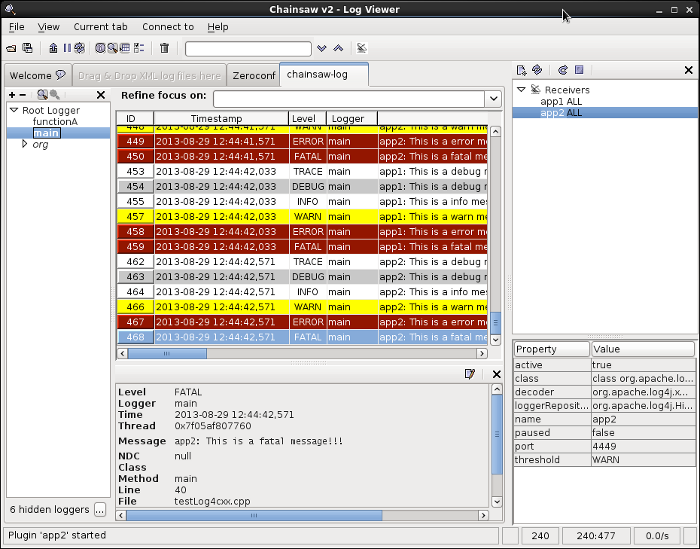
The Apache Chainsaw log viewer runs in a socket server configuration while the log producing application runs as a socket client. Thus start and configure Chainsaw before the application generating the log messages or "restart the receivers" in Chainsaw before starting the applications to be logged.
Dialog box presented upon start-up:
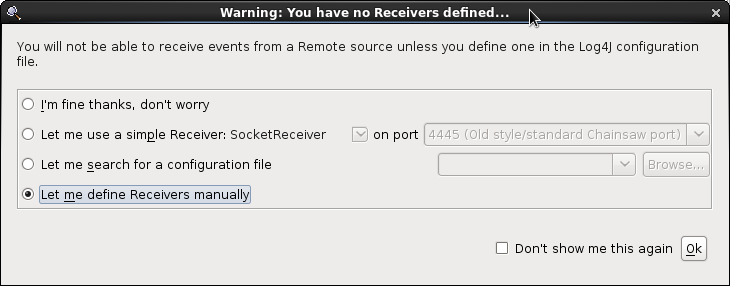
The Log4cxx configuration below will set-up the application to be the socket client which will attach to the Chainsaw socket server.
Configure Chainsaw:- Right click on "Receivers"
- Select option "New Receivers"
- Select "New XMLSocketReceiver" (This will open up a new dialog window shown below)
- Populate the options:
- active: false (default)
- class: org.apache.log4j.net.XMLSocketReceiver (default)
- decoder: org.apache.log4j.xml.XMLDecoder
- name: name-of-application-you-are-logging
- paused: false (default)
- port: 4448 (default)
- threshold: TRACE (Select from TRACE, DEBUG, INFO, WARN, ERROR, FATAL, OFF, ALL)
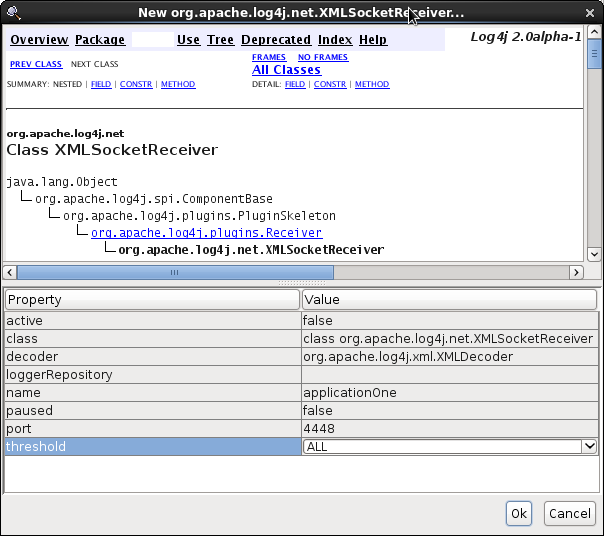
When restarting applications logging with XMLSocketReceiver appender, you must reset the chainsaw socket server receivers. After the applications have attached logged, and exited (closed the socket connections), one must right click “Receivers” and restart the receivers to relaunch the socket servers if one is to restart the applications and begin logging again.
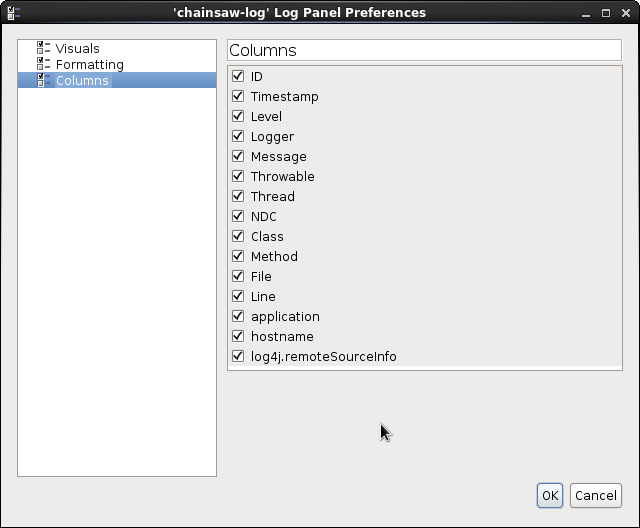
Other user configurations: Select the "chainsaw-log" tab to display the logging pane. From here the configuration menu is available from the tool bar "Current tab" + "LogPanel preferences ...".
I find that log levels shown as text messages are more clear than the icons.
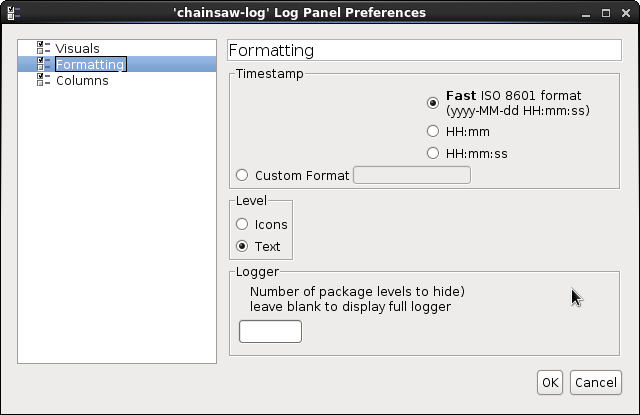
Display Columns Configuration: Toolbar “Current Tab” + “Log panel preferences”
The application Log4cxx configuration to log to the console as well as to connect and stream XML log messages to Chainsaw:
<?xml version="1.0" encoding="UTF-8" ?>
 <log4j:configuration xmlns:log4j="http://jakarta.apache.org/log4j/">
  <!-- Output the log message to system console.
    -->
  <appender name="ConsoleAppender" class="org.apache.log4j.ConsoleAppender">
    <param name="Target" value="System.out"/>
        <layout class="org.apache.log4j.PatternLayout">
            <param name="ConversionPattern" value="%-5p %c{1} - %m%n"/>
        </layout>
  </appender>

  <appender name="ChainsawAppenderXML" class="org.apache.log4j.XMLSocketAppender">
        <param name="RemoteHost" value="192.168.1.101"/>
        <param name="Port" value="4448" />
        <layout class="org.apache.log4j.xml.XMLLayout">
           <param name="properties" value="true" />
           <param name="locationinfo" value="true" />
        </layout>
  </appender>

  <root>
        <priority value="error" />
        <appender-ref ref="ConsoleAppender"/>
        <appender-ref ref="ChainsawAppenderXML"/>
  </root>

  <category name="main" >
        <priority value ="trace" />
  </category>

  <category name="MySAX2Handler" >
        <priority value ="error" />
  </category>

 </log4j:configuration>
Other Logger Display Programs:
Apache Chainsaw is my personal preference as it can display streaming logs from multiple programs, can ingest log files and works. Many of the programs listed below have their personal strengths but often omit a key basic feature possessed by Chainsaw.
| Log Viewer | Description |
|---|---|
| Apache Chainsaw | Display log files, socket streams, filters, supports multiple applications. |
| Apache LogFactor5 | Display log files, socket streams, filters, supports multiple applications. LogFactor5 ships with Apache Log4j. Download from http://logging.apache.org/log4j/ RHEL6 install: yum install log4j RHEL6 script: /usr/bin/logfactor5 Run: java -cp log4j-1.2.8.jar org.apache.log4j.lf5.StartLogFactor5 |
| jLogViewer | Java log viewer - log files only. No network access. Downloads: http://sourceforge.net/projects/jlogviewer/ Run: java -jar jlogviewer_1_0_0d.jar |
| Lilith | Ports predefined for various uses. Use port 11000 for XML LoggingEvent. Downloads: http://sourceforge.net/projects/lilith/files/lilith/0.9.43/ cd /opt tar xzf lilith-0.9.43-bin.tgz /opt/lilith-0.9.43/bin/lilithGot connection error: log4cxx: Could not connect to remote log4cxx server log4cxx: IO Exception : status code = 111 |
| LogViewer4J | Allows only one streaming connection, one port. Installation: Download: http://sourceforge.net/projects/logview4j/ cd /opt sudo unzip /home/greg/Downloads/logview4j-1.0.3.zip cd /opt/logview4j-1.0.3; java -jar logview4j-1.0.3.jarNo interactive configuration. Uses port config and limits set in: /opt/logview4j-1.0.3/config/logview4j.properties Got connection errors: log4cxx: Could not connect to remote log4cxx server log4cxx: IO Exception : status code = 111 |
| OLV: Otros log viewer and parser | Seems very configurable, capable, customizable but I could not get it to work.
cd /opt
unzip olv-2013-01-24.zip
cd /opt/olv-2013-01-24
/opt/olv-2013-01-24/olv.sh
Socket listener: Tools + Staart socket listener + select log importer: XMLFormatter |
| Vigilog | Log files only. No network logging.
Downloads: http://sourceforge.net/projects/vigilog/files/ cd /opt unzip vigilog-1.3.1-assembly.zipStart script: #!/bin/bash if [ -d /usr/java/latest ] then PATH=/usr/java/latest/bin:$PATH export JAVA_HOME=/usr/java/latest export CLASSPATH=/usr/java/latest/lib/tools.jar:./ export MANPATH=$JAVA_HOME/man:/opt/man:$MANPATH fi cd /opt/vigilog-1.3.1 java -jar vigilog-1.3.1.jar |
| JLV: Java logging viewer | Stand alone app or Eclipe plugin. |
| LogSaw | Based on Eclipse platform using Apache Lucene. |
| Log.io | Web based display. Powered by node.js + socket.io Downloads: https://github.com/NarrativeScience/Log.io |
| Log2Web | Web based - beta, not worked on since 2008 |
Log4cxx can be configured using a configuration file or by using API calls. As a feature to add robustess to the application, it is often wise to allow an application to continue with some simple basic log4cxx configuration if the configuration file is absent.
Basic code snipets to detect if the configuration file exists.If not, set a basic log4cxx configuration programatically.
#include <sys/stat.h>
#include <sys/types.h>

#ifdef WIN32
#include <io.h>
#include <direct.h>
#define GETCWD _getcwd
#else
#include <unistd.h>
#define GETCWD getcwd
#endif

#include <log4cxx/logger.h>
#include <log4cxx/xml/domconfigurator.h>
#include <log4cxx/simplelayout.h>
#include <log4cxx/consoleappender.h>

// Set global logger pointer
log4cxx::LoggerPtr logger(log4cxx::Logger::getLogger("logger4cxx"));

...
...

   // Initialize variables
   log4cxx::AppenderPtr defaultAppender = NULL;
   log4cxx::LayoutPtr   defaultLayout   = NULL;

...
...

   struct stat fileStat;
   std::string topicName(name);
   std::string log4cxxConfigFile = "Log4cxxConfig.xml";
   errno = 0;  // Set by stat() upon an error

   if( stat(log4cxxConfigFile.c_str(), &fileStat) == 0)
   {
       if(fileStat.st_mode & S_IRUSR) // User has read permission?
       {
           log4cxx::xml::DOMConfigurator::configure(log4cxxConfigFile);
       }
   }
   else   // Set logging to use the console appender with a "simple" layout
   {
       defaultLayout   = new log4cxx::SimpleLayout();
       defaultAppender = new log4cxx::ConsoleAppender(defaultLayout);
       logger->addAppender(defaultAppender);
       logger->setLevel(log4cxx::Level::getInfo());  // Log level set to INFO

       std::cout << "Could not open Log4cxx configuration XML file: " << log4cxxConfigFile << std::endl;
       perror("Problem opening log4cxx config file");
       char cCurrentPath[200];
       std::cout << "Current Path: " << GETCWD(cCurrentPath, 200) << std::endl;
   }

...
...

   // cleanup when application closes
   if(defaultAppender) delete defaultAppender;
   if(defaultLayout)   delete defaultLayout;
Log4cxx includes appenders to write to the console, files, sockets, etc. Log4cxx can be extended to include your own custom appender to write log messages to a medium of your choice such as a message queue or NoSQL data store.
The following is an example of a simple custom appender upon which one may generate a useful Log4cxx appender specific to their needs. The solution includes a new C++ class which derives from the SkeletonAppender class. This class is compiled and linked with your application even though you do not instantiate an object from this class. It is the Log4cxx framework which instantiates and invokes the appender based on the configuration file directives.
File: MyCustomAppender.hpp
#ifndef DDS_APPENDER_H
#define DDS_APPENDER_H

#include <log4cxx/appenderskeleton.h>
#include <log4cxx/spi/loggingevent.h>
#include <string>

namespace log4cxx
{

class MyCustomAppender : public AppenderSkeleton
{
public:
    DECLARE_LOG4CXX_OBJECT(MyCustomAppender)

    BEGIN_LOG4CXX_CAST_MAP()
        LOG4CXX_CAST_ENTRY(MyCustomAppender)
        LOG4CXX_CAST_ENTRY_CHAIN(AppenderSkeleton)
    END_LOG4CXX_CAST_MAP()

    MyCustomAppender();
    ~MyCustomAppender();

    // This method is called by the AppenderSkeleton#doAppend method
    void append(const spi::LoggingEventPtr& event, log4cxx::helpers::Pool& p);

    void close();

    bool isClosed() const { return closed; }

    bool requiresLayout() const { return true; }
};

}
#endif
File: MyCustomAppender.cpp
#include "MyCustomAppender.hpp"
#include <stdio.h>

using namespace log4cxx;
using namespace log4cxx::helpers;

// Register this class with log4cxx
IMPLEMENT_LOG4CXX_OBJECT(MyCustomAppender)

MyCustomAppender::MyCustomAppender()  {}

MyCustomAppender::~MyCustomAppender() {}

void MyCustomAppender::append(const spi::LoggingEventPtr& event, Pool& p)
{
       if ( this->layout == NULL ) {
             LOG4CXX_ENCODE_CHAR(nameStr, name);
             std::string msg("No Layout set for the appender named [ ");
             msg.append(nameStr);
             msg.append(" ].");

             LOG4CXX_DECODE_CHAR(msgL, msg);
             errorHandler->error(msgL);
           return;
       }

       log4cxx::LogString fMsg;

       this->layout->format(fMsg, event, p);

       LOG4CXX_ENCODE_CHAR(fMsgStr, fMsg);

       // This example appender prints to the screen just like
       // a console appender. Do something with the data here
       printf("MyCustomAppender: %s", fMsgStr.c_str());

       LogVector.push_back(fMsgStr);
}

void MyCustomAppender::close()
{
        if (this->closed)
        {
                return;
        }

        this->closed = true;
}
The main program testLog4cxx.cpp from the prior example above, will work. There is no change to the code. Invocation of the new appender is through the configuration file which references the new appender. The new appender does have to be linked with the application in order to be available.
Compile and static link: g++ testLog4cxx.cpp MyCustomAppender.cpp -I/opt/include /opt/lib/liblog4cxx.a -lapr-1 -laprutil-1
Note that the registration of the appender is done by using the macro IMPLEMENT_LOG4CXX_OBJECT(MyCustomAppender) This macro adds factory classes for the appenders to a hashmap which utilizes libdl to load the appender dynamically when it is called for use in the configuration file. (This is how they do it: libdl and dynamic linking)
The following configuration file will invoke the custom appender.
<?xml version="1.0" encoding="UTF-8" ?>
 <log4j:configuration xmlns:log4j="http://jakarta.apache.org/log4j/">
  <!-- Output the log message to system console.
    -->
  <appender name="ConsoleAppender" class="org.apache.log4j.ConsoleAppender">
    <param name="Target" value="System.out"/>
        <param name="Threshold" value="WARN"/>
        <layout class="org.apache.log4j.PatternLayout">
            <param name="ConversionPattern" value="%-5p - %m (%F:%L) %n"/>
        </layout>
  </appender>

  <appender name="MyCustomAppender" class="MyCustomAppender">
    <param name="Target" value="System.out"/>
        <param name="Threshold" value="WARN"/>
        <layout class="org.apache.log4j.PatternLayout">
            <param name="ConversionPattern" value="%d{MMM dd yyyy HH:mm:ss,SSS} [%-5p] - %m %n"/>
    </layout>
  </appender>

  <root>
        <priority value="ALL" />
        <appender-ref ref="ConsoleAppender"/>
        <appender-ref ref="MyCustomAppender"/>
  </root>

 </log4j:configuration>
Run: ./a.out
MyCustomAppender: Aug 27 2013 15:04:18,837 [WARN ] - this is a warn message, not too bad.
ERROR - this is a error message, something serious is happening. (test.cpp:34)
MyCustomAppender: Aug 27 2013 15:04:18,837 [ERROR] - this is a error message, something serious is happening.
FATAL - this is a fatal message!!! (test.cpp:35)
MyCustomAppender: Aug 27 2013 15:04:18,837 [FATAL] - this is a fatal message!!!
- Python script to performa diff between two log files - Compare the log messages but ignore certain fields that are different every time, like the time stamp.
- Add new custom logging fields
- Apache log4cxx Home Page
 Books:
 |
C++ How to Program
by Harvey M. Deitel, Paul J. Deitel ISBN #0131857576, Prentice Hall Fifth edition. The first edition of this book (and Professor Sheely at UTA) taught me to program C++. It is complete and covers all the nuances of the C++ language. It also has good code examples. Good for both learning and reference. |

|
 |
Logging and Log Management: The Authoritative Guide to Understanding the Concepts Surrounding Logging and Log Management
by Anton Chuvakian, Kevin Schmidt ISBN #1597496359, Syngress First edition (December 13, 2012) Logging and Log Management helps to simplify the process of effectively analyzing large volumes of diverse logs. |
|

