

CVS is primarily used as a source code control system for text files. Programmers will generate revisions to individual source code files. A collection of these files may define a specific software release. CVS aims to manage the collection of these files and the respective revisions of the individual files that make up the collection. CVS is a command driven file checkout, update, compare and management system. Front end web and desktop GUI systems are available to ease the use of CVS.
- Set environment variables: (add to your .bashrc file)
Environment variables:
export CVSROOT='/home/Project/CVS_root' - directory for CVS source code repository export CVSEDITOR=/bin/vi - Set environment variables: (add to your .cshrc file) (for csh users)
Environment variables:
      setenv CVSROOT  '/home/Project/CVS_root'
      setenv CVSEDITOR /bin/vi
- CVSROOT: Location of CV source code repository.
CVS commands are used with directives and command line options to create a repository, check-out, check-in and update code and interrogate changes between versions. Typically one will use a CVS repository which has already been generated, if not, one must be generated and populated with source code text files.
Create the CVS "root" of a new CM repository:
cvs -d /home/Project/CVS_root init
-d: Directory used for repository. Note that an absolute pathname must be used.
[Potential Pitfall]: This is the CM repository and not a developer working area. No work, editing of files or changes should be made directly to this directory. The repository is loaded using the "import" command and files checked out to the users local working directory using cvs commands. Files are edited in the user's local working directory. Files are checked-in to synchronize and update the repository using cvs commands. Files are added and deleted using cvs commands. All interactions with the repository are done with cvs commands.
To put your project under CVS control:
Check in all files and directories from within the current working directory. The directory referenced is the tree structure for CVS not your current path.
cvs import -m "Put text description here" ProgABC CorpABC startThe command notation is: import [-options] repositoryName vendortag releasetag
This will place the files and directories in your current working directory (and all recursively through the directory structure below the current), under CVS control. CorpABC is a "vendor tag". Start is a "release tag". The CM directory structure will be $CVSROOT/ProgABC/...
Now that it has been checked into the repository you can save,back-up or remove the current working directory. All future work will take place by checking out code from the repository. This check-out code will be under CVS CM control. The directory you just imported is not under CVS control.
Example:
      cd $HOME/src/ProgABCWorkingDir
      cvs import -m "Put text description here" ProgABC CorpABC start
The files and directories in $HOME/src/ProgABCWorkingDir were just checked into a repository named ProgABC.
All exports and checkouts will start with the directory name ProgABC (not ProgABCWorkingDir).
Use the same name for both if that is your intent.
[Potential Pitfall]: The directory you are importing can not be in the same directory as $CVSROOT. An endless recursive loop will take place as it will try and check-in the repository itself.
This is to get a copy of the sources and directories with the intent that the files will not be altered but shipped off site. Code extracted from CVS with export cannot be checked-in because export does not create any administrative entries.
A tag must be specified. Thus an original release would be extracted by:
cvs export -r start ProgABCStart is the name of the first entry into CVS. See import. The directory ProgABC is generated with the contents of the export placed in that directory.
By default CVS will apply recursively through sub-directories. Use the option flag "-l" to prevent this. The option "-R" explicitly defines the recursive behavior.
CVS command options: cvs [ cvs_options ] cvs_command [ command_options ] [ command_args ]
| CVS Option | Description |
|---|---|
| --allow-root=rootdir | Specify repository on the command line |
| -d cvs_root_directory | Use cvs_root_directory as the directory pathname of the repository. Overrides the $CVSROOT environment variable. |
| -e editor-command | Use the editor command specified for entering log information. Overrides $CVSEDITOR and $EDI‐ TOR environment variables. |
| -f | Do not read the ~/.cvsrc file. |
| -H | Display CVS command help |
| -n | Do not make any changes to the root repository. Print out what would happen if the "-n" flag was not used. |
| -Q | Quiet mode. Less verbose than normal. |
| -q | Marginally quiet mode. Reports of recursion are suppressed. |
| -v | Show CVS software version and copyright information |
| -w | Make new working files read-write. Overrides the setting of the $CVSREAD environment variable. |
CVS Commands:
| CVS Option | Description |
|---|---|
| admin | CVS interface to assorted administrative facilities. |
| annotate | Shows the revision modified each line of a file. |
| checkout | Check out sources from the CVS repository for editing |
| commit | Check files into the CVS repository |
| diff | Show file differences between revisions |
| export | Export sources from CVS. The files exported are NOT under CVS control. Note that files which are checked out are under CVS control. Use export to deliver or publich code. |
| history | Show status of files and users |
| import | Import sources into CVS. Used for initial checkin of code into the CVS root repository. |
| log | Print out log information for files |
| ls | Used to list files and directories in the local working directory. Repository required. |
| rls | Used to list files and directories in the repository. |
| rdiff | Generate "patch" format diffs between releases. |
| release | Indicate that a Module is no longer in use. Cancels the effect of cvs checkout. |
| update | Bring local work directory in sync with repository |
| add | Add file or directory to the repository |
| delete | Delete file or directory from the repository |
Prints command flags used with CVS (Help):
cvs -H
Checkout:
cvs co ProgABCIn this case, module "ProgABC" is a directory which will be created in your current directory with all the appropriate sub-directories and files.
The files/directories to checkout can be referred to by module name or relative path name from $CVSROOT.
To checkout a particular (previous) release or build:
cvs co -r Rel-1A ProgABCThis will checkout the files necessary for the previous build for Rel-1A. The release or "tag" name in this example is "Rel-1A".
cvs edit ProgABC/file.c
This pulls out a single file for editing without getting the whole project.
cvs unedit ProgABC/file.cAbandon work on file.
Note that all directories will contain a sub-directory named CVS/. This is for CVS CM management and should never be altered.
Command: cvs checkout [options] modules...
| Checkout Command Option | Description |
|---|---|
| -D date | Use the most recent revision no later than date. This option implies -P. cvs checkout -D yesterday module-name |
| -l | Local; run only in current working directory. |
| -n | Do not execute CVS command, just show what would be done if the flag "-n" was not used. |
| -P | Prune (remove) empty directories in user working directory. |
| -R | Default behavior. Checkout directories recursively. |
| -r tag[:date] | Checkout the revision specified by tag or, when date is specified and tag is a branch tag, the version from the branch tag as it existed on date. This option implies -P. |
| -d directory | Create a directory called dir for the working files, instead of using the module name. |
| -c | Copy the module file, sorted, to the standard output, instead of creating or modifying any files or directories in your working directory. |
| -s | Like -c, but include the status of all modules, and sort it by the status string. |
Update:
When working with a team of software developers, it is wise to periodically update your local working code to benefit from the changes and bug fixes contributed by other members of the team.
cvs update -PdThis command updates the files and directories in the current directory and recursively through all sub-directories.
An update without the option "-Pd" will not add or delete directories in the local working directory when synchronizing with the root repository.
cvs -qn update -PdThis command will show you the updates it is planning on making without performing the actual update. Your local files changed are also shown.
Command: cvs update [-ACdflPpR] [-I name] [-j rev [-j rev]] [-k kflag] [-r tag[:date] | -D date] [-W spec] files...
| Update Command Option | Description |
|---|---|
| -P | Prune (delete/remove) all directories deleted in the root repository. |
| -d | Add any directory to your local working directory which has been added to the root repository. |
| -D date | Use the most recent revision no later than date. |
| -f | Only useful with the -D or -r flags. If no matching revision is found, retrieve the most recent revision. |
| -R | Default behavior. Update directories recursively. |
| -r tag[:date] | Retrieve the revisions specified by tag or, when date is specified and tag is a branch tag, the version from the branch tag as it existed on date. |
| -l | Local; run only in current working directory. |
| -C | Overwrite locally modified files with clean copies from the repository (the modified file is saved in .#file.revision). |
| -I name | Ignore files whose names match name (in your working directory) during the update. More than one "-I" can be specified. |
Merge conflicts:
Merge conflicts occur when the following sequence of events occurs:- you check out or update your code from CVS
- someone else checks in some changes to the code
- you make changes to text in the same line number as the other person's changes
- you perform an update - CVS shows that a conflict has occured! The same lines is a file have been altered by two people and CVS does not know how to update that file.
The cvs update will list all of the files recursively and list them prefixed with a single letter: M (modified), U (updated), A (added), C (conflict), etc. All files marked with a "C" are files with conflicts which require user resolution. Edit all files with conflicts.
Updates are marked in the file and you are obligated to edit the file and resolve the conflict or conflicts if multiple. The conflicting lines will be in the updated file. The changes of both people are marked in the file delimited by <<<<<<<, ======== and >>>>>>>.
Example file section showing the conflict:
    <<<<<<<  filename
      your uncommitted changes
      will appear first
    =======
      conflicting changes from the repository
      will appear here
    >>>>>>>  version number given here
Be sure to remove the <<<<<<<, ======== and >>>>>>> lines and alter the file so that it reflects your desires. Once the conflict has been resolved, the file will be ready to be checked in.
History / Status / Log:
Status of checked out working repository.cvs status [-v] ProgABC/file.cOption "-v": Print tag information.
OR cvs status [-v] ProgABC
Review log of change history:
cvs log file.c
Show local modifications to review what you may want to eventually check-in:
cvs -qn update -Pd
All modifications in your local working directory will be shown with the prefix "M".
Lists all files recursively from your current directory. While this is the "update" command, the command options "-qn" prevent an actual update.
CVS descriptors:
- M: modified files in the local working directory. Use "cvs diff filename" to see your modifications.
- C: conflict with repository. Modifications in your file "collide" with changes made and checked into the repository. This means that someone modified the same lines of code and CVS does not know how to merge your file with that in the repository because it does not know who is correct.
- U: file updates have been made to the repository.
- P: Like U, but the cvs server sends a patch instead of an entire file.
- A: The file has been added to your private copy of the sources.
- R: File has been removed
- ?: File does not correspond to anything in the source repository
Command: cvs history [-report] [-flags] [-options args] [files...]
| History Command Option | Description |
|---|---|
| -l | Show last modification only. |
| -D date | Show data since date. |
| -c | Report on each time the repository was modified. |
| -e | Everything (all record types). |
| -m module | Report on a particular module. |
| -T | Report on all tags. |
| -x type | Show records of a specified type:
|
| -o | Report on checked-out modules (default behavior). |
| -a | Show data for all users. |
| -w | Show only the records for modifications done from the same working directory where history is executing. |
| -f file | Show data for a particular file. Multiple files can be specified on the command line. |
| -r rev | Show records referring to revisions since the revision or tag named rev. |
| -t tag | Show records since tag tag was last added. |
| -u user-name | Show records for user user-name. |
Check-in / Commit:
When done editing the files check-in (commit) your changes:
Check in files from within the directory. i.e. file.c must be in your current working directory.
      cvs ci file.c
            OR
      cvs ci -m "Put text description here" file.c
            OR
      cvs ci -m "Put text description here" ProgABC
The second check-in example will commit the entire module.
(Files, directory structure and all)
Multiple files or directories can be checked in on the same command line. This is preferred if the files are all part of the same change set.
cvs ci file1.c file2.c file3.c dira/file1.c dirb/file1.c
Cleanup and get rid of all the files:
cvs release -d ProgABC
The flag -d will delete all of your working sub-directories. CVS will let you know if files have changed and prompt you for a [y/n] reply.
Note that the cvs directives "ci" and "commit" are the same and perform the exact same function.
Command: cvs commit [-lnRf] [-m 'log_message' | -F file] [-r revision] [files...]
| Check-in Command Option | Description |
|---|---|
| -l | Local; run only in current working directory. |
| -R | Default behavior. Checkout directories recursively. |
| -r revision | Commit to revision. revision must be either a branch, or a revision on the main trunk that is higher than any existing revision number |
| -c | Refuse to commit files unless the user has registered a valid edit on the file via cvs edit. |
| -F file | Read the log message from file, instead of invoking an editor. |
| -m "log message goes here" | Use message as the log message, instead of invoking an editor. |
| -f | Force cvs to commit a new revision even if you haven't made any changes to the file. Causes the -c and -R (default) options are ignored. |
| facilities. |
Add/Delete files:
Add a new file to your project:
cvs add file.cMultiple files can be specified on the command line:
cvs add fileA.c fileB.c fileC.c
Add a new directory "dirname/" and its files (and all sub-directories and files recursively), to your project:
      find dirname/ -type d \! -name CVS -exec cvs add {} \;
      find dirname/ \( -type d -name CVS -prune \) -o \( -type f -exec cvs add {} \; \)
      cvs commit -m "Programmer comments go here" dirname/
Note that if you specified a CVSEDITOR environment variable and no commit comments are added, the editor specified will pop-up for each and every directory to allow you to enter a check-in comment. CVS will get its commit/check-in comments.
Delete a file/directory from your project:
cvs delete file.cThe additions/deletions only fully take place after a check-in (commit) of the repository is performed.
Renaming a file:
      mv original-filename new-filename
      cvs delete original-filename
      cvs add new-filename
      cvs commit -m "Renamed file" original-filename new-filename
Modules:
The term "ProgABC" in our example is the name of a module as defined by the modules file found in CVSROOT/modules. To add a new module:cvs co CVSROOT/modulesThen update changes:
cd CVSROOT
vi modules - Add module name and path to file
      cvs ci -m "Add comments here" modules
      cd ..
      cvs release -d CVSROOT
The module "ProgABC" is a short name for "$CVSROOT/ProgABC"
Web cgi script cvsmodules to list all modules available for check-out.
Tagging a build/revision
Tag a revision such that the current build is known to be made up of particular releases of various files.
cvs tag Rel-1A ProgABCWhere Rel-1A is the tag name for the build of module "ProgABC"
Tag a repository (directory/module) to add the symbolic name to the "snapshot" of the current sources. Tag the repository before check-in.
If bug fixes are added afterwards, only those files which have been changed need be re-tagged.
To relocate a tag that already exists to a newer set of code:
cvs tag -F Rel-1A ProgABC
Diff:
cvs diff file.cThis will compare the version of the file in your working directory with that of the original you checked out.
The following will compare the two revisions of the file:
cvs diff -r 1.1 -r 1.2 file.c
The following will compare the two tagged versions of the file:
cvs diff -r tag-a -r tag-b file.c
Command: cvs diff [-lR] [-k kflag] [format_options] [(-r rev1[:date1] | -D date1) [-r rev2[:date2] | -D date2]] [files...]
| Diff Command Option | Description |
|---|---|
| -l | Local; run only in current working directory. |
| -R | Default behavior. Checkout directories recursively. |
| -r tag[:date] | Compare with revision specified by tag or, when date is specified and tag is a branch tag, the version from the branch tag as it existed on date. |
| -D date | Use the most recent revision no later than date. |
| -lines | Show lines (an integer) lines of context. |
| -a | Treat all files as text and compare them line-by-line, even if they do not seem to be text. |
| -b | Ignore trailing white space. |
| -B | Ignore changes that just insert or delete blank lines. |
| --brief | Report only whether the files differ, not the details of the differences. |
| --ignore-all-space | Ignore white space when comparing lines. |
| --ignore-blank-lines | Ignore changes that just insert or delete blank lines. |
| --ignore-case | Ignore changes in case; consider upper- and lower-case to be the same. |
| --side-by-side | Use the side by side output format. |
| -w | Ignore white space when comparing lines. |
The lines which are flagged as different are listed. Modern GUI diff tools are far superior and their use should be encouraged for complex changes. CVS diff can specify a GUI tool specifically: cvs diff -prog /usr/bin/tkdiff file.ext
- tkdiff: [download] Comes with tkcvs CVS GUI front-end.
Examples of CVS diffs with tkdiff: (See: tkdiff --help)- tkdiff old-URL@revA new-URL@revB
- tkdiff -r457 -r459 file-name
- gtkdiff: Has diff3 and merge features. Written with GTK+. After gtkdiff-0.8.0, GNOME desktop required.
- diffUse: Diff/merge GUI tool. Good line matching features. Supports Unicode.
- kdiff3:
Graphical directory and file diff, merge and edit. KDE3/Qt based.
Supports drag and drop. Comes with S.u.S.E. distro. (Cross platform)
MS/Windows download available. A very good directory and file diff and
merge tool.
- Difference: kdiff3 file1 file2
- Difference: kdiff3 file1 file2 file3
- Difference of two files: kdiff3 directory1/file directory2
- Difference: kdiff3 directory1 directory2
- Merge: kdiff3 directory1 directory2 -o dest-directory
- Merge: kdiff3 file1 file2 -m
- Merge: kdiff3 file1 file2 -o output-file
- Diff with SVN: svn diff -r 457:459 --diff-cmd kdiff3 file-name
- Kompare: Ships with (RHEL6/RHEL5/FC3+) KDE SDK. [manual]
Included in Red Hat RPM package "kdesdk" an Ubuntu package "kompare".
[Potential Pitfall]: RPM installation error:error: Failed dependencies: perl(DCOP) is needed by kdesdk-3.5.4-3.el5.i386Solution: Install the dependency package "kdebindings". - mgdiff: Motif-based graphical file difference browser and merge. Comes with S.u.S.E. distro.
- Meld: Compare, edit and merge.
- xxdiff: Compare 2 or 3 files and merge. Also compares directories.
- gvim and gvimdiff
- Beyond Compare - commercial tool (cross platform)
The CVS user can generate a personal configuration file to customize default CVS behaviour by genrating a file .cvsrc in the user's home directory. This configuration file allows you to specify default command line arguments to CVS commands. For example:
File: $HOME/.cvsrccheckout -P update -P
This changes the behavior of a checkout and update. When performing the command "cvs update", the actual command performed will be "cvs update -P"
Note that "cvs co" and "cvs checkout" will both experience modified behavior.
[Potential Pitfall]: If a file becomes locked and you need to remove the lock from the CVS repository remove the lock files. (files beginning with "#")
This configuration uses a CVS repository on a remote server. One must set an additional environment variable and specify the remote location when using CVS commands. There are four methods available: (ext is generally preferred)
- EXT: (external connection)
- Add the following to your ~/.bashrc file (client system):
export CVS_RSH="ssh" export CVSROOT=':ext:user1@cvserver.megacorp.com:/home/Project/CVS_root' export CVSEDITOR=/bin/vi - Specify the remote "root":
Example check-out (using the environment variable CVSROOT: cvs checkout ProgABC
or specify on the command line: cvs -d :ext:user1@cvserver.megacorp.com:/home/Project/CVS_root checkout ProgABC
where any cvs command and arguments can be specified (checkout used as an example)
- Add the following to your ~/.bashrc file (client system):
- PSERVER: (password-authenticated server)
Specify the remote "root" directory:
Connect and authenticate: cvs -d :pserver:user1@cvserver.megacorp.com:/home/Project/CVS_root login
You will then be asked for your password.
Example check-out: cvs -d :pserver:user1@cvserver.megacorp.com:/home/Project/CVS_root checkout ProgABC
[Potential Pitfall]: The password will be stored in ~/.cvspass and is a potential security hole. Be vigilant! - KSERVER: (Kerberos security)
- GSERVER: (GSSAPI: Generic Security Services API)
- CVS Information: - man pages on cvs, diff. Info in /usr/info/cvs.info--- and cvsclient.info---
- RCS Information: - man pages on rcsintro, rcs, co, ci, ident, rcsclean, rcsdiff, rcsmerge, ident, rlog, merge.
Also see:
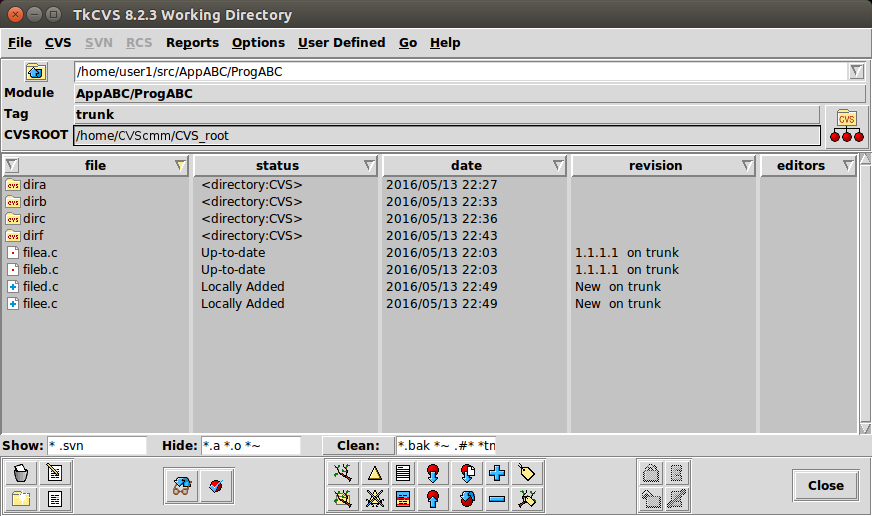
TkCVS is a Tcl/Tk-based graphical front-end to CVS (and Subversion and RCS). It includes TkDiff for file diffs and merges. TkCVS is used for tagging, merging, importing, exporting, checking in/out, file query and status of CVS managed files.
Installation:
- Ubuntu: sudo apt-get install tkcvs
- Red Hat/Fedora/CentOS: rpm -ivh tkcvs-8.2.2-1.el6.rf.noarch.rpm
This RPM is available from the EPEL (Extra Packages for Enterprise Linux) website.
Requires tcl and tk.
Usage:
It is intuitive and easy to use. Start in your local working directory from the command line with the command: tkcvs
tkdiff:
The CVS GUI tkcvs will invoke tkdiff to show file differences but it can also be invoked specifically for a diff from the command line:
Show file differences between the local working version of the file with that in the "HEAD" of the repository:
tkdiff file.c
Show file differences between the local working version of the file with that of the tagged version:
tkdiff -r tagname file.c
- CVS Home.org - Links and info.
- Version control tools for Linux
- Extensive list of CVS information links
- Gnome: Pharmacy - GNOME compliant front-end to CVS
- KDE/QT: LinCVS
- gCvs - C++ CVS client front ends for multiple platforms
- TkCVS - CVS client front end
- ViewVC - Web front-end
- CVS web - Web front end (simple)
- LXR - Linux Cross Referencing Tool (and Web front end to CVS)
- Glimpse - search engine used by XLR
(also see WebGlimpse.net)
- Glimpse - search engine used by XLR
- jCVS - JAVA front end to CVS
- JAVA-CVS
- KDE/QT: Cervisia
 Books:
 |
"Open Source Development with CVS"
Karl Fogel ISBN #158880173X, Coriolis Open Press. The only book I know of which is totally dedicated to the topic of CVS. |

|

