|
|
YoLinux Tutorial: aWebDap V1.8b - Web front-end to LDAPaWebDap is a web front-end to an LDAP address directory server. It provides a friendly way to query, view, update, add and delete data on the LDAP server. AWebDap supports HTML web browsers but also offers unique support for web enabled cell phones using WTAI for dialing and address book interface features. It supports LDAP URL's which will interface with the address book in MS/Outlook. The native LDAP server capabilities are unchanged and will interface with address clients in their usual fashion. It also supports vCARD which works very well for some cell phones, personal organizer applications and the Netscape 4.X address book. Unlike other web front-ends, use of the aWebDap front-end was intended for the non-techie and presents an interface which is intuitive. (i.e. you don't have to understand LDAP jargon like dn statements) Even your mother will like it! |
| Download and Installation: |
Installation of aWebDap V1.8b:
The example shown here is configured to match the LDAP database described by the LDIF files and configuration presented in the YoLinux LDAP quick start example.
Purchase supported "premium" version: (more features: add images (i.e. corporate logo), set background colors, ...)
| Purchase the commercial version of aWebDap and have the capability to customize your interface background color and add a corporate graphic. It also includes support via email. $65.00 US (PayPal) |
|
System requirements:
Tested with:
Verify that the appropriate modules are installed with the command:
Note: For non Red Hat Linux, aWebDap is compiled with gcc version 2.96, 3.2.2, and 3.4.4 and should be compatable with later releases.
[Potential Pitfall]: Red Hat introduced SELinux (Security Enhanced Linux) with Enterprise Linux 4 and Fedora Core 3 which is so secure that sometimes if not configured perfectly, it will not allow aWebDap to operate. If you can't get SELinux configured correctly, you can disable SELinux by setting the SELINUX directive in the file: /etc/selinux/config
SELINUX=disabled |
[Potential Pitfall]: System misconfiguration can cause aWebDap to crawl to intolerably slow speeds. Your server must be self aware. Add a line in /etc/hosts for the servers IP address:
    127.0.0.1           node-name localhost.localdomain localhost
    XXX.XXX.XXX.XXX     node-name
|
[Potential Pitfall]: When using current v3 LDAP servers (Fedora Core 3+), one must configure OpenLDAP to accept v2 protocol access. Add the statement "allow bind_v2" after the schema "include" directives in the file /etc/openldap/slapd.conf.
[Potential Pitfall]: If your web server log (/var/log/httpd/error_log) shows the following error:
[error] /var/www/cgi-bin/awebdap.cgi: error while loading shared libraries: libldap.so.2: ... |
[Potential Pitfall]: Ubuntu / Debian - AWebDap generated hyperlink uses unknown protocol "www://" instead of "http://".
.. ... www 80/tcp http # WorldWideWeb HTTP www 80/udp http # HyperText Transfer Protocol ... .. |
.. ... http 80/tcp www # WorldWideWeb HTTP http 80/udp www # HyperText Transfer Protocol ... .. |
| aWebDap web interface and use: |
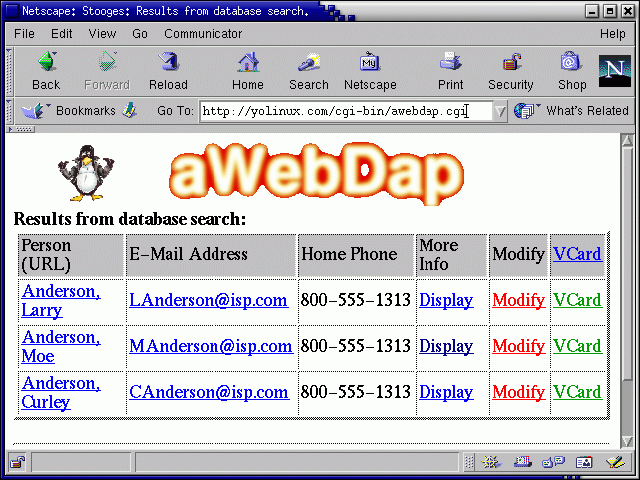
Working examples are shown below, not screen shots.
|
|
Press the "Submit" button to try the aWebDap online demo.
|
|
Note on cgi generated links: AWebDap will use the CGI environment to determine the port number used
for the "Display", "Modify" and "VCard" links. By default web servers are configured for port 80 and thus no port is specified. If a port other than 80 is used by the web server, aWebDap will detect this and specify the alternate port. If aWebDap detects that the port is a usable service as
defined by the file /etc/services, then the service prefix is used.
If no existing service is defined in the file /etc/services, the service will be specified as "http://", the server name
and then the port number (":number").
Examples:
|
|
|
|
| HTML Form Configuration: |
HTML Form Source to interface with aWebDap cgi:
<HTML> <HEAD> <TITLE>Stooges Family Directory</TITLE> </HEAD> <BODY bgcolor="#ffffff" text="#000000"> <P> <HR width=65%> <P> <CENTER> <H1>Stooges Family Directory</H1> </CENTER> <P> <HR width=65%> <P> <H3>Phone Book and Contact Database</H3> <P> <form method="post" action="http://localhost/cgi-bin/awebdap.cgi"> <select name="selectoption"> <option value="personname">Name contains: <option value="residentofl">Lives in the city of: <option value="residentofpostalcode">Postal code begins with: <option value="residentofstate">Lives in the state of: </select> <input type="hidden" name="type" value="query"> <input type="hidden" name="awebdapdomain" value="DOMAIN1"> <input type="TEXT" name="searchfor" value="*"> <input type="submit" value="Submit"> </form> <P> </BODY> </HTML> |
Note:
| Configuration file: /etc/awebdap.conf |
AWebDap configuration file directives: (Case sensitive)
| Directive | Description | Default |
|---|---|---|
| START | Give name assigned to configuration file segment. (required) | |
| OrgName | Organization name used for display purposes only. (Usually set to match the LDAP attribute "o".) | AWEBDAP |
| OrgLogo | Active only in the premium version. Image file referenced in web pages generated by aWebDap (i.e. search results, info, modify). Use full URL path from starting "/" (Apache DocumentRoot) i.e. OrgLogo:/images/logo.gif: refers to file /var/www/html/images/logo.gif for the default Red Hat and Fedora Apache configuration. | |
| HtmlLang | Specify the "lang" in the HTML tag "<html lang="EN" dir="LTR">" This helps AWebDap support other languages as specified by RFC1766. AWebDap specifies LTR: Left-to-right text. (V1.8b) | EN |
| CSS | Active only in the premium version. Specify a Cascading Style Sheet (css) file. (i.e. /awebdap.css The leading "/" is required or the browser will look to the "cgi-bin" directory for the file.) If this is specified then BackgroundColor, TextColor, LinkColor and VLinkColor are all ignored. (V1.8) Example: CSS:/stooges.css: | |
| HtmlCharset | Specify the "charset" in the meta tag "<meta http-equiv="Content-Type" content="text/html; charset=UTF-8">" This helps AWebDap support other languages and character sets. (V1.8b) | UTF-8 |
| VcardCharset | Specify the "charset" for VCARD output: "Content-type: text/x-vcard; charset=us-ascii; ..." This helps AWebDap support other languages and character sets. (V1.8b) | us-ascii |
| BackgroundColor | Active only in the premium version. Set HTML background color for the web interface. (V1.7) Example: BackgroundColor:#ffffff: | "#d0d0d0" |
| TextColor | Set HTML text color for the web interface. | "#000000" (black)(V1.7) Example: TextColor:#000000: |
| LinkColor | Set HTML hyperlink text color for the web interface. (V1.3) | "#0000ff" (blue)(V1.7) |
| VLinkColor | Set HTML visited hyperlink text color for the web interface. (V1.7) | "#000080" (navy) |
| PageType | Output Page Type:
| HtmlExtra |
| UrlReturnLink | Display URL hyperlink at bottom of page. Typically used to return to search page. Also many cell phones do not have a "back" button and require this link. Specify relative URL from "DocumentRoot" directory. The network service (i.e. http) and server name are determined from other aWebDap directives (WebServer,WebServerPort). Link text displayed will be "Return". (V1.7) | |
| TechContact | Email address of technical contact. Displayed as the webmaster in error messages. (required) | |
| WebServer | Specify node name or IP address for Apache host. Note that the loopback address (127.0.0.1) will only work for running the demo on your desktop. Use the network resolvable node name or IP address of the computer used. For (Apache) web servers utilizing virtual hosts (using Apache directive "VirtualHost"), the host name must be used. (V1.7) | Default host name retrieved from CGI environment. If undeterminable it will be set to 127.0.0.1 |
| WebServerPort | Specify port number to be used for hyperlinks if different than that used to access the aWebDap cgi. Defaults to port used to initially access aWebDap cgi. Rarely used. Https or any defined port wil be automatically recognized and used. (V1.7) | Default port number retrieved from CGI environment. Default port is the port used to access awebdap. If it is a defined service in the file /etc/services, the service name is used in the link. Specify nothing or an integer. |
| CgiBinPath | Specify CGI relative path as viewed in the URL by client (NOT the path on the local machine). Typically cgi-bin/ (Note use of terminating "/") (V1.7) | cgi-bin/ |
| LdapServer | Specify node name or IP address for LDAP host. Note that the loopback address (127.0.0.1) will only work for running the demo on your desktop. Use the network resolvable node name or IP address of the computer used. AWebDap and the LDAP server do not need to reside on the same system. AWebDap can access a remote LDAP server. | 127.0.0.1 |
| LdapPort | Option to specify a non regular LDAP port. This will break the ldap URL (if used) which relies on the prefix "ldap://" and a default port assignment. (V1.7) | 389 |
| SearchBase | LDAP search base used for queries "o=orgname" (V1.2 now requires entire LDAP definition) (required) V1.7 Appended to the DN defined by "DefineAddDn". (Does not affect "AddAttribute" entries. Each must be individually defined.) | |
| AddFilter | LDAP filter string to add using AND logic. This entry is added to the LDAP search filter. (i.e. (&(objectclass=inetOrgPerson)(...)) ) If NULL, it is ignored. (V1.5) | NULL |
| IgnoreType | LDAP Object type to ignore. This LDAP object type is ignored during search. (i.e. organizationalRole) (advisable but not required) (V1.5) | NULL |
| UpdateDnInput | T/F (V1.4) If "T" then LDAP bind "DN" input entry box is generated on the HTML update/modify form. The input entry given is combined with the SearchBase directive to construct the LDAP DN. (i.e. cn=input-user-id,SearchBase User enters only the input-user-id) If "F" then bind DN specified by BindDn directive is used for update/modify. | F(alse) |
| UpdateDefaultDisplayDn | T/F Useful only if directive UpdateDnInput is "T". (V1.4) If "T" then LDAP bind "DN" entry box on the HTML update/modify form is pre-filled with the text specified by the directive DefaultDisplayDn. If "F" then HTML entry box for user ID/bind DN is blank. | T(rue) |
| DefaultDisplayDn | (V1.4) Useful only if directive UpdateDefaultDisplayDn is "T". This value is combined with the SearchBase directive to construct the LDAP DN. (i.e. cn=DefaultDisplayDn,SearchBase) | |
| BindDn | (i.e. cn=admin,o=orgname) LDAP bind "dn" (Distinguished name) for database connection, access and management. The actual LDAP DN is given. It is used as-is and not constructed into another form. | |
| UpdatePassword | T/F (V1.4) If "T" then password entry box is generated on the HTML update/modify form and a password is required for LDAP update. If "F" then specify password to be used is given using the directive BindPw. | T(rue) |
| BindPw | (V1.4) This sets a default LDAP bind password so no password is needed for updates. | |
| ReadPassword | T/F Used for non-anonymous/anonymous LDAP read.(V1.4) The LDAP database security is not defined here. This is just the information on the method of LDAP access for aWebDap. If "T" then Password required for read. Define bind info with the ReadBindDn and ReadBindPw directives. If "F" then an anonymous bind is performed to read the LDAP database. | F(alse) |
| ReadBindDn | LDAP bind "dn" to use for non-anonymous read. (V1.4) ReadPassword must be "T" | |
| ReadBindPw | Password to use for LDAP bind for non-anonymous read. (V1.4) ReadPassword must be "T" | |
| SortResultsBy | Search results sorted by LDAP attribute specified. | cn |
| InfoDisplayName | Define LDAP attribute name to be displayed at top of "Info" page. i.e. "displayname", "uid", "cn",... or use the aWebDap option "default". The LDAP attribute must also be defined with the "field" directive. If not specified, it will not be obtained from LDAP and thus not able to be displayed. (V1.7) | Default option: "default" (or NULL) (Default will concatenate "givenname sn") |
| InfoDisplayNickName | NickName displayed at top of "Info" page. i.e. John "The Dude" Johnson. Option only available if InfoDisplayName uses "default" and LDAP attribute "xmozillanickname" is not empty. The attribute "xmozillanickname" must also be defined with a "field" directive. Note that "xmozillanickname" is not defined in the default inetOrgPerson schema but must be defined in a new extended schema. (V1.7) | F(alse) (If T(rue), concatenate "givenname xmozillanickname sn") |
| AllowURLAccess | T/F (True/False) Generate hyperlink which is an LDAP URL. This interfaces well with the address book in MS/Outlook. This feature is only useful where anonymous read access of the LDAP database is allowed. Also works with Netscape versions 4.5 - 4.7 | T(rue) |
| UpdateModify | T/F Generate and display column and hyperlink for database information modification. | T(rue) |
| UpdateModifyTrigger | T/F Write update info to a file and execute script. If "T" then you must specify UpdateModifyTriggerScript. If data file (UpdateModifyTriggerData) is specified, then data file is used as a command line argument to the script. (V1.3) | F(alse) |
| UpdateModifyTriggerScript | File name (full path) of script to execute. Script executed after LDAP update. (V1.3) UpdateModifyTrigger must be "T". | |
| UpdateModifyTriggerData | File name (full path) of data file generated by aWebDap from update/modify form data. This is a CSV file of the HTML form data. Data is written in the same order as field definitions in configuration file. (V1.3) UpdateModifyTrigger must be "T". | |
| DisplayFullInfoLink | T/F Generate and display column and hyperlink for database information display. (V1.7 has spelling change) | T(rue) |
| DeleteEntry | T/F Generate and display column and hyperlink for the deletion of a database entry. | F(alse) |
| VcardOrgName | Organization name displayed in vCARD Example: VcardOrgName:Stooges.org: | |
| DisplayVcard | T/F Generate and display column and hyperlink to a vCARD for search results. Example: DisplayVcard:T: | T(rue) |
| DisplayMapURL | Display a URL to a Map on search results page:
Example: DisplayMapURL:T:T:mapquest.com/:Map:c:postalcode:st:l:postalAddress: | F(alse) |
| AddRuleMIperiod | T/F LDAP db additions only. Add a period to middle initials if that field is populated by a single letter. Applies to LDAP attribute middlename only. Note that this may have to be added to your Object schema before it can be used. This will be applied to the construction of the DN and CN with the directives DefineAddDn and DefineAddCn. (V1.3) | F(alse) |
| DefineAddDn | Define the attributes used to construct the DN used for LDAP directory additions. Multiple statements allowed and probably required. Required for LDAP additions. i.e. dn: cn=Moe Howard,ou=MemberGroupA,o=stooges. If "SearchBase" is ",o=stooges" then define the DN as constructed from the attributes cn, ou and by default the "SearchBase" will be appended. (V1.7) | |
| DefineAddCn | Define the attributes used to construct the CN. Multiple statements allowed. Required for LDAP additions. (V1.7) | |
| ObjectClass | Used to describe LDAP schema for entry addition to the directory. Multiple statements allowed. At least four "objectClass" statements required for inetOrgPerson definition: top, person, organizationalPerson, inetOrgPerson. (ObjectClass required for LDAP additions) | |
| UrlAttribute | Link to something: Define an LDAP attribute to be a URL hyperlink. The LDAP attribute specified will be used to construct a URL hyperlink. (V1.8)
| |
| ImgAttribute | Embed an image in the info display page described by "field": Define an LDAP attribute to be a IMG image source display tag. The LDAP attribute specified will be used to generate a IMG image source display. (V1.8)
| |
| WtaiAttribute | Four fields to make the cell phone WTAI interface available for the LDPA attribute specified. Field:
Note: Specify only one LDAP attribute per display page for "Soft key" support. The "Soft Key" can only apply to one item as there is only one soft key on the phone. (V1.8) | |
| AddAttribute | Three fields used to describe LDAP schema for entry addition to the directory. Multiple statements allowed and probably required.
| |
| field | Attributes described in table below. Multiple field statements allowed. At least four required. |
Note:
The field directive: This defines the aWebDap properties for the LDAP attribute for aWebDap search and display.
The first four aWebDap field statements must be ordered and stated in the following order:
Support for these four fields is hard coded within aWebDap.
Field directive arguments: field:argument 1:argument 2:argument 3:...:argument 13:
| Argument Number | Values | Description |
|---|---|---|
| 1 | field | The aWebDap keyword field |
| 2 | LDAP attribute | LDAP attribute name as defined by the LDAP schema. |
| 3 | T/F | True/False: Prefix the search query filter with a "*" |
| 4 | T/F | True/False: Postfix the search query filter with a "*" |
| 5 | Display name | The display name of the LDAP attribute as presented by aWebDap on the web page. |
| 6 | HTML form name | This is the "option value" for the selection presented on the first form and used for the first LDAP directory query. This is case sensitive. |
| 7 | T/F | Display attribute in search results. |
| 8 | T/F | Display this attribute when displaying the information page. |
| 9 | T/F | Display attribute in the attribute modification form. This allows this data field to be modified. |
| 10 | integer number | The field length or "size" of the text input field on the HTML form. Set to "0" if not used. |
| 11 | integer number | The field "maxlen" value of the text input field on the HTML form. Set to "0" if not used. |
| 12 | vCARD descriptor | The vCARD descriptor for the field is placed here. If none is specified then this field is not added to the vCARD. |
| 13 | T/F | Field is written to CSV (Comma Separated Variables) trigger data file. (V 1.3) |
The sample awebdap.conf file is configures to match the LDAP database described by the LDIF files and configuration presented in the YoLinux LDAP quick start example.
Note that this sample shows a configuration file supporting three web interfaces and two domains. Only the first "DOMAIN1" is needed to support the HTML form above.
program:awebdap: version:1.8: START:DOMAIN1: OrgName:Stooges:org: PageType:HtmlExtra: OrgLogo:/images/awebdap-logo.gif: CSS:/stooges.css: OrgContact:webmaster@your-domain.com: TechContact:webmaster@your-domain.com: VcardOrgName:Stooges.org: CgiBinPath:cgi-bin/: WebServer:127.0.0.1: LdapServer:127.0.0.1: LdapPort:389: SearchBase:o=stooges: AddFilter:objectclass=inetOrgPerson: IgnoreType:organizationalRole: UpdateDnInput:F: UpdateDefaultDisplayDn:T: DefaultDisplayDn:StoogeAdmin: BindDn:cn=StoogeAdmin,o=stooges: ReadPassword:F: UpdatePassword:T: AllowURLAccess:T: DisplayVcard:T: UpdateModify:T: UpdateModifyTrigger:F: DeleteEntry:F: DisplayFullInfoLink:T: SortResultsBy:sn: ImgAttribute:destinationindicator:T:www.threestooges.com:Display Photo: DisplayMapURL:T:T:www.mapquest.com/:Map::postalcode:st:l:postalAddress: # #field: ldap-field : # Filter wildcard prefix T/F : # Filter wildcard post T/F : # Display-name : # HTML Form name (search form)(Case sensitive. Form must match case in this config file) : # Display T/F : # Info-Display T/F : # Modify T/F : # Modify-field-length (0 if not stated) : # max-length (0 if not stated) : # Vcard-name # Must have order: (Not editable! Displayed by default) # 0) cn - common name # 1) displayname # 2) sn - Surename # 3) givenname - First name field:cn:T:T::personname:F:F:F:0:0:fn:T: field:displayname:F:F:Person (LDAP URL)::T:T:F:0:0:fn:F: field:sn:F:T:::F:F:F:0:0:n:F: field:givenname:F:T:::F:F:F:0:0:n:F: # # The following values may be edited, displayed etc field:mail:F:F:E-Mail Address::T:T:T:32:50:email;internet:T: field:homephone:F:F:Home Phone::T:T:T:14:20:tel;home:T: field:telephonenumber:F:F:Work Phone::T:T:T:14:20:tel;work:T: field:mobile:F:F:Mobile Phone::F:T:T:14:0:tel;cell:T: field:postalAddress:F:F:Street Address::F:T:T:32:50:adr:T: field:l:T:T:Locality/City:residentofl:F:T:T:20:50:+adr:T: field:st:F:F:State/Province:residentofstate:F:T:T:4:24:+adr:T: field:postalcode:F:T:Postal Code:residentofpostalcode:F:T:T:12:0:+adr:T: field:destinationindicator:F:F:Photo::F:T:T:32:50::F: START:ADMIN1: OrgName:Stooges:org: PageType:HtmlExtra: BackgroundColor:#d0d0d0: TextColor:#000000: OrgContact:webmaster@your-domain.com: TechContact:webmaster@your-domain.com: VcardOrgName:Stooges.org: CgiBinPath:cgi-bin/: LdapServer:127.0.0.1: LdapPort:389: SearchBase:o=stooges: AddFilter:objectclass=inetOrgPerson: IgnoreType:organizationalRole: UpdateDnInput:F: UpdateDefaultDisplayDn:T: DefaultDisplayDn:StoogeAdmin: BindDn:cn=StoogeAdmin,o=stooges: ReadPassword:F: UpdatePassword:T: AllowURLAccess:T: DisplayVcard:F: UpdateModify:T: UpdateModifyTrigger:F: AddRuleMIperiod:T: DeleteEntry:T: DisplayFullInfoLink:T: SortResultsBy:sn: # DefineAddDn:cn: DefineAddDn:ou: #DefineAddDn:o: DefineAddCn:givenname: DefineAddCn:middlename: DefineAddCn:sn: # ObjectClass:top: ObjectClass:person: ObjectClass:organizationalPerson: ObjectClass:inetOrgPerson: # AddAttribute:fmsn:sn:T: AddAttribute:fmgivenname:givenname:T: AddAttribute:fmmiddleinitial:middleinitial:F: #AddAttribute:fmo:o:T: AddAttribute:fmou:ou:T: AddAttribute:fmst:st:F: # field:cn:T:T::personname:F:F:F:0:0:fn:F: field:displayname:F:F:Person::T:T:F:0:0:fn:F: field:sn:F:T:::F:F:F:0:0:n:F: field:givenname:F:T:::F:F:F:0:0:n:F: # # The following values may be edited, displayed etc field:mail:F:F:E-Mail Address::T:T:T:32:50:email;internet:F: field:homephone:F:F:Home Phone::T:T:T:14:20:tel;home:F: field:description:F:F:Spouse Name::F:T:T:14:0::F: field:businesscategory:F:F:Company Name::T:T:T:14:40::F: field:telephonenumber:F:F:Work Phone::T:T:T:14:20:tel;work:F: field:mobile:F:F:Mobile Phone::F:T:T:14:0:tel;cell:F: field:postalAddress:F:F:Street Address::F:T:T:32:50:adr:F: field:l:T:T:Locality/City:residentofl:F:T:T:20:50:+adr:F: field:st:F:F:State/Province:residentofstate:T:T:T:4:24:+adr:F: field:postalcode:F:T:Postal Code:residentofpostalcode:F:T:T:12:0:+adr:F: START:DOMAIN2: OrgName:Delta:org: PageType:HtmlExtra: BackgroundColor:#ffffff: TextColor:#000000: OrgContact:webmaster@Delta.org: TechContact:webmaster@your-domain.com: VcardOrgName:Delta.org: CgiBinPath:cgi-bin/: WebServer:127.0.0.1: LdapServer:127.0.0.1: LdapPort:389: SearchBase:o=delta: AddFilter:objectclass=inetOrgPerson: IgnoreType:organizationalRole: UpdateDnInput:F: UpdateDefaultDisplayDn:T: DefaultDisplayDn:DeanWormer: BindDn:cn=DeanWormer,o=delta: ReadPassword:F: UpdatePassword:T: AllowURLAccess:T: DisplayVcard:T: UpdateModify:T: UpdateModifyTrigger:F: DeleteEntry:F: DisplayFullInfoLink:T: SortResultsBy:sn: field:cn:T:T::personname:F:F:F:0:0:fn:F: field:displayname:F:F:Person::T:T:F:0:0:fn:F: field:sn:F:T:::F:F:F:0:0:n:F: field:givenname:F:T:::F:F:F:0:0:n:F: # # The following values may be edited, displayed etc field:uid:F:F:Year:graduatingyear:T:T:F:0:0::F: field:employeetype:F:F:Status (P,S,A,D)::F:T:T:1:0::F: field:mail:F:F:E-Mail Address::T:T:T:32:50:email;internet:F: field:homephone:F:F:Home Phone::T:T:T:14:20:tel;home:F: field:telephonenumber:F:F:Work Phone::T:T:T:14:20:tel;work:F: field:mobile:F:F:Mobile Phone::F:T:T:14:0:tel;cell:F: field:postalAddress:F:F:Street Address::F:T:T:32:50:adr:F: field:l:T:T:Locality/City:residentofl:F:T:T:20:50:+adr:F: field:st:F:F:State/Province:residentofstate:F:T:T:4:24:+adr:F: field:postalcode:F:T:Postal Code:residentofpostalcode:F:T:T:12:0:+adr:F: |
Note that the ADMIN1 configuration will display an extra table field for a hyperlink to delete an entry.
| More HTML Form Examples: |
Sample HTML form for ADMIN1:
<HTML>
<HEAD>
<TITLE>Administer Stooges Family Directory</TITLE>
</HEAD>
<BODY bgcolor="#ffffff" text="#000000">
    <P>
    <HR width=65%>
    <P>
    <CENTER>
       <H1>Administer Stooges Family Directory</H1>
    </CENTER>
    <P>
    <HR width=65%>
    <P>
    <form method="post" action="/cgi-bin/awebdap.cgi">
    <select name="selectoption">
       <option value="personname">Name contains:
       <option value="residentofl">Lives in the city of:
       <option value="residentofpostalcode">Postal code begins with:
       <option value="residentofstate">Lives in the state of:
    </select>
    <input type="hidden" name="type" value="query">
    <input type="hidden" name="awebdapdomain" value="ADMIN1">
    <input type="TEXT" name="searchfor">
    <input type="submit" value="Submit">
    </form>
    <P>
</BODY>
</HTML>
|
Note that the ADMIN1 configuration will display a an extra table field for a hyperlink to delete an entry. The vCARD column was not displayed as it does not seem like a feature that would be used by an administrator. Of course aWebDap is completely configurable to do whatever you like.
| Person | E-Mail Address | Home Phone | Company Name | Work Phone | State/Province | More Info | Modify | Delete |
| Fine, Larry | LFine@isp.com | 800-555-1313 | ABC Inc. | (800)555-1212 | TX | Display | Modify | Delete |
| Howard, Moe | MHoward@isp.com | 800-555-1313 | XYZ Inc. | none | TX | Display | Modify | Delete |
| Howard, Curley | CHoward@isp.com | 800-555-1313 | IJK Inc. | none | TX | Display | Modify | Delete |
Sample HTML form for ADMIN1 domain and LDAP entry addition:
<HTML>
<HEAD>
<TITLE>Stooges Directory</TITLE>
</HEAD>
<BODY bgcolor="#ffffff" text="#000000">
    <P>
    <HR width=65%>
    <P>
    <H3>Add an entry</H3>
<FORM method="post" action="/cgi-bin/awebdap.cgi">
<INPUT type="hidden" name="adddn" value="ADDDN">
<INPUT type="hidden" name="awebdapdomain" value="ADMIN1">
<TABLE cellspacing="2" cellpadding="2" >
<TR><TD>Last Name:</TD><TD><INPUT type="text" name="fmsn" size="32"></TD></TR>
<TR><TD>First Name:</TD><TD><INPUT type="text" name="fmgivenname" size="32"></TD></TR>
<TR><TD>Organizational Unit/Group:</TD>
<TD><SELECT name="fmou">
    <option value="MemberGroupA">MemberGroupA
    <option value="MemberGroupB">MemberGroupB
    </SELECT>
</TD></TR>
<TR><TD>State/Province:</TD><TD><INPUT type="text" name="fmst" size="2"></TD></TR>
</TABLE>
<P>
Password: <INPUT type="password" name="addpassword">  <INPUT type="submit" value="Add User Data">
</FORM>
<P>
</BODY>
</HTML>
|
Note:
Sample HTML form for DOMAIN2:
<HTML>
<HEAD>
<TITLE>Delta House Directory</TITLE>
</HEAD>
<BODY bgcolor="#ffffff" text="#000000">
    <P>
    <HR width=65%>
    <P>
    <CENTER>
       <H1>Delta House Directory</H1>
    </CENTER>
    <P>
    <HR width=65%>
    <P>
    <H3>Phone Book and Contact Database</H3>
    <P>
    <form method="post" action="http://localhost/cgi-bin/awebdap.cgi">
    <select name="selectoption">
       <option value="graduatingyear">Graduation Year:
       <option value="personname">Name contains:
       <option value="residentofl">Lives in the city of:
       <option value="residentofstate">Lives in the state of:
    </select>
    <input type="hidden" name="type" value="query">
    <input type="hidden" name="awebdapdomain" value="DOMAIN2">
    <input type="TEXT" name="searchfor">
    <input type="submit" value="Submit">
    </form>
    <P>
</BODY>
</HTML>
|
| vCARD support: |
The following are the vCARD directives used to describe LDAP entries:
| LDAP field | vCARD directive |
|---|---|
| cn | FN |
| sn | N |
| title | TITLE |
| EMAIL;PREF;INTERNET EMAIL;INTERNET | |
| homePhone | TEL;VOICE;HOME TEL;HOME |
| telephoneNumber | TEL;WORK |
| mobile | TEL;CELL |
| facsimileTelephoneNumber | TEL;FAX;WORK |
| postalAddress l st postalCode | ADR;TYPE=WORK ADR |
| homePostalAddress | ADR;TYPE=HOME |
| description | NOTE |
| labeledURI | URL |
The aWebDap directive VcardOrgName in /etc/awebdap.conf is used to define the vCARD directive org.
| Using Trigger Scripts: |
The following is a trigger script I use to email updates to someone who cares. The script e-mails the CSV output data file which contains the information from an update to a single record. The script could have been written to perform a SQL database update or anything you want. To invoke this feature, the following has to be set in the file: /etc/awebdap.conf
Sample shell script: /opt/bin/aWebDapTrigger.sh
#!/bin/sh
# Uses package metamail
/usr/bin/metasend -b -F "Webmaster <Webmaster@domain.org>" -s "LDAP database updated" \
                  -t larry@isp.org -c curley@isp.net -e 7bit  -m "text/plain" \
                  -f /opt/etc/aWebDapTriggerGreeting.txt -n  -m "text/plain" -f $1
|
#!/bin/sh
# Uses package mailx
cat /opt/etc/aWebDapTriggerGreeting.txt $1 | /usr/bin/mailx -a "From: Webmaster <Webmaster@domain.org>" \
                  -s "LDAP database updated" \
                  -c curley@isp.net larry@isp.org
|
| Other aWebDap configurations: |
| Changelog: |
| Purchase Commercial version of aWebDap online: |
Purchase supported "premium" version: (more features: add images (i.e. corporate logo), set background colors, ...)
| Purchase the commercial version of aWebDap and have the capability to customize your interface background color and add a corporate graphic. It also includes support via email. $65.00 US (PayPal) |
|

|
Return to http://YoLinux.com home page
Return to YoLinux Tutorial Index
Return to YoLinux LDAP Tutorial
Feedback Form
Copyright © 2001, 2002, 2003, 2004, 2005, 2006 by Greg Ippolito