

- Printing: Microsoft Internet Explorer does not scale
web pages to fit the printer. Use a table with a width of 800px to
print the width of a US size of paper.
- Forwarding: This will forward to a different site.
File: index.html
This line placed anywhere in a web page will forward the web surfer to a different site. Typically it is placed in the "HEAD" section of an HTML document. This can also be the entire contents of the file. Change the zero to a differnt value to pause for a given number of seconds before forwarding. For an alternate method using Javascript see method to open a new window below in Javascript section.<META HTTP-EQUIV="Refresh" Content="0; URL=http://www.company.com/dir1/">For more on redirecting web pages and domains see the YoLinux Apache redirect Tutorial. - Do not allow page to be pulled from browser cache. Force load of new page:
This is important for a page which is changed frequently or for dynamic content.<meta http-equiv="Cache-Control" content="no-cache">
- Prevent Microsoft XP from adding "Smart Tags" to your page when displayed:
<meta name="MSSmartTagsPreventParsing" content="TRUE">
- Open new browser window for next link:
<A HREF="..." TARGET="_TOP">...</A>
- Send web server environment variable information in a web page: file.shtml
- Referring URL: <!--#echo var="HTTP_REFERER" -->
- Visitor's IP address: <!--#echo var="REMOTE_ADDR" -->
- Requested URL: <!--#echo var="REQUEST_URI" -->
- Server name: <!--#echo var="HTTP_HOST" -->
- Visitor's Browser: <!--#echo var="HTTP_USER_AGENT" -->
- Redirect Status Code: <!--#echo var="REDIRECT_STATUS" -->
- E-mail form data with no CGI:
Display:
HTML source:
This will e-mail the following:<form name="application" method="post" action="mailto:user@isp-abc.net?SUBJECT=formtest" enctype="text/plain"> Please enter your full name: <input type="text" size="20" maxlength="30" name="Your_name"> <br> Please enter your phone number: <input type="text" size="12" maxlength="12" name="Your_phone"> <br> <input type="submit" name="submit" value=" Submit By E-Mail "> <input type="reset" name="reset" value=" Clear Form "> </form>Your_name=Jenny
If you wish to use CGI there a PERL script available (FormMail.pl) from Matt's Script Archives at http://www.worldwidemart.com/scripts/. By default it uses "sendmail" as an MTA. To use another, edit the script to reference another mail program.
Your_phone=867-5309
- The HTML "mailto" tag: Link Text
<a href="mailto:person@isp.com?subject=Email subject line goes here&body=Text for the body of the email goes here">Link Text</a>
- Other web page email tricks:
- EScrambler - Tricks to hide your email address from spammers
- Tooltip annotation tags:
Annotate an acronym, abreviation or word with the full meaning by hovering over the tagged acronym as follows.
Example - hover the mouse over the following: DNS<abbr title="Domain Name Service">DNS</abbr> - Blank table entries:
Table with a blank entry: More pleasing table: Column 1 Column 2 one two three Column 1 Column 2 one two three
HTML:
<TR><TD>three</TD><TD></TD></TR>Corrected HTML:
<TR><TD>three</TD><TD><BR></TD></TR>To make a blank entry more appealing place a "<BR>" (line break) in the table cell instead of blank or nothing.
- Table outlines:
Text heading goes here:
HTML source:
<TABLE bgcolor="#000000" border="0" cellpadding="4" cellspacing="1" width="100%">
Use nested tables with an all black table as the outer table. Extra "TD" data cells in the inner table will result in black lines of separation between the data cells.
<TR bgcolor="#f0f0f0"><TD>
<H3>Text to print:</H3>
</TD></TR>
</TABLE>
- Display of Mathematical Formulas using HTML: (example)
                            r-1
                Tu,v = ∑ cv1m,vWCum   for u = 0 to r-1,   for v = 0 to c-1
                            m=0

                              (c/2)-1                                           c-1
                rvou,v = ∑ Tu,mWRvm + NuWRvc/2 + ∑ T*u,c-mWRvm
                              m=0                                        m=(c/2)+1

                where:       r = nr
                                 c = nc
                                 WR = ej2π/c
                                 WC = ej2π/r

                                 j = √-1
<sub> r-1</sub> T<sub>u,v</sub> = ∑ cv1<sub>m,v</sub>W<sub>C</sub><sup>um</sup> for u = 0 to r-1, for v = 0 to c-1 <sup> m=0</sup> <sub> (c/2)-1 c-1</sub> rvo<sub>u,v</sub> = ∑ T<sub>u,m</sub>W<sub>R</sub><sup>vm</sup> + N<sub>u</sub>W<sub>R</sub><sup>vc/2</sup> + ∑ T*<sub>u,c-m</sub>W<sub>R</sub><sup>vm</sup> <sup> m=0 m=(c/2)+1</sup> where: r = nr c = nc W<sub>R</sub> = e<sup>j2π/c</sup> W<sub>C</sub> = e<sup>j2π/r</sup> j = √-1 - Preferred "Canonical" URL's:
Tell the search engines (Google, Yahoo, MSN, etc ...) your preferred URL for that page. This also nullifies any importance given to another web site if they copy your content. Explicitly state the Canonical URL for the page with the "canonical" tag in the page <head> section. For example, for this page:<head> <link rel="canonical" href="http://www.yolinux.com/TUTORIALS/LinuxTutorialWebTricks.html" /> ...This will also distinguish this page from http://yolinux.com and other possible references to the same domain. This preference can also be enforced through an Apache redirect configuration. - Obfuscated URL's:
- URLs are generally given as a domain name which is resolved int an IP
address by a DNS name server.
http://www.megawebhost.com - An IP address may be given directly.
http://98.137.246.8/ - Spammers often try to hide their source by using decimal form:
http://1653208584/ - The "%" followed by a hex value converts to the ascii character.
The URL itself cannot use hex values.
http://yolinux.com/%54%55%54%4F%52%49%41%4C%53/ is the same as http://yolinux.com/TUTORIALS/ - Using a different port: Web servers typically use port 80. Many IPS's block people from putting up a web server by scanning for computers using port 80 and if found they are blocked. You can set up Apache to run on any port. If using port 8080 one would access it by referencing that port: http://208.188.34.109:8080/mywebpage.html
Helpful links:
- RFC 1738 - Uniform Resource Locators (URL)
- Decipher URL's - Sam Spade
- URL Revealer
- ASCII table
- URL Encoding
- The spammer's 10-digit or less secret - Using 64 bit numbers.
- URLs are generally given as a domain name which is resolved int an IP
address by a DNS name server.
- Shortened URL's:
Comparative list of URL shortening services
Note: You want a service which will employ a 301 redirect (not a 302 as some do). This is to maintain SEO benefits of a URL which points to your page. - Login URL's:
- Password Protected Web Sites:
Here is a trick to encorporate a login and password into a URL. Typicall one would attempt to enter the password protected area of the web site and the user would be confronted with a login dialog box into which one would enter the user id and password. Another option is to enter a URL with the login and password embedded.http://login-id:password@UrlOfDomain.com/protectedPath/WebPage.html
- FTP with a URL:
ftp://login-id:password@your-domain.com/file-name
This will login and download file. If using anonymous ftp(login name is "anonymous", the login/password is not needed.
- Password Protected Web Sites:
- Use a URL service to shorten and forward URL's: TinyURL.com
- HTML Links and resources:
- Special characters
- VisiBone: Webmasters Color Laboratory - Helps you pick a color
- Check your web page:
- Dr. Watson - Analyze HTML syntax, links, spell check,...
- NetMechanic.com - HTML check, broken links, ...
- Validator.w3.org - HTML Validator
- HtmlHelp.com: Validator
- HTMLCodeTutorial.com: Quick List - guide to HTML tags
- HTML Barebones guide
- HTML tag list
- HTML Special Symbols
- PixelPlace.com - Graphics, backgrounds and icons
- Web designer's resource list
- HtmlGoodies.com - More tips and tricks
- W3.org - Style sheets
- HtmlGoodies.com: CSS - (Cascading Style Sheets)
- HTMLstyle.com - Webmaster resources
- HTML Writers Guild
- International Webmasters Association - Association, training, certification
- Communication Arts - Articles and weekly features on graphics design.
- WDF.net: Web Designers Forum
- AlistaPart.com - for web site creators.
- Web site tools and resources:
- Linkchecker - Available in RPM form from the Red Hat powertools collection. (I use this tool: linkchecker file-to-check.html)
- LinkScan - Commercial product to find/detects broken links.
CSS Frameworks:
- BluePrint - browser discrepancies, layouts, form styles, tools
- 960 Grid - based on 960 pixel width. Supports layouts
- Elastic - collumn layout framework
Responsive design refers to the design of a web page using CSS and an HTML layout to respond to various screen sizes so that one page can scale for use on a mobile device to a full sized desktop with the same web page. These frameworks read the browser size to determine which layout to choose.
- Twitter Bootstrap: Open sourced by Twitter, this framework is feature rich and in broad use.
- Zurb Foundation: grid based layout
- Grumby: Your choice on the number of collumns
- Blueprint CSS: CSS framework supports cross platform development
- 960.gs: comes with standard grid layouts
- Responsive.gs: 12, 16, 24 collumn layouts
CSS coupled with Javascript have been coded to produce animation and "Motion UI" frameworks:
- ZURB Motion UI: Good integration with Angular. Uses SASS
- Animate.CSS: CSS based animation. Simple to integrate into existing web pages.
- AnimeJS: JavaScript animation library that works with any CSS Properties, SVG or any DOM attributes, and JavaScript Objects.
- Hover.CSS: CSS animation library for use with buttons, CSV and UI elements. 2D transitions.
- Velocity: JavaScript animation suite for fade, slide, scroll, reverse, ... Uses same API syntax as JQuery (JQuery not required).
- AniJS: Div attributes to direct Javascript animations. Simple to use.
At least 10% of the male population is color blind or suffers from some form of color deficiency. Color blind individuals confuse red and green and some blue and yellow.
Check your web page using the site Visicheck which will show how your page will appear to a color blind individual.
Web page checklist:
- Avoid using red and green or blue and yellow color combinations for combinations of text and background colors.
- Label colored elements so you do not rely soley on color keys.
- If using red, green or blue font colors, also use an underline or bold text attribute for an additional visual cue.
- Use text to describe images and their purpose next to the image.
References:
WYSIWYG HTML editor:
- Kompozer: WYSIWYG Editor, FTP integration, HTML text interface. (Legacy: Nvu)
- Amaya: W3C WYSIWYG Editor/Browser: XHTML/HTML, MathML, SVG, DTD, CSS and XPointer/RDF collaborative annotation support.
- Mozilla SeaMonkey Best known as a browser but select "File" + "Edit Page" or "File" + "New" + "Composer Page" to enter the "Composer" component. This is a WYSIWYG editor which requires no training. Anyone can use it. (Not available in Firefox.)
- Bluefish: HTML text editor with support for WebDAV, FTP, SFTP, HTTP, HTTPS, unicode, language translation, syntax highlighting, ...
- Gnome: Screem - HTML text editor
JPEG, GIF and PNG images can be optimized for a small file size for quicker browser loading by removing metadata, reduced image map (fewer colors), optimizing compression parameters, ...
- Trimage - GUI and command line
- pngquant - command-line utility for lossy compression of PNG images
- Posterizer - Median Cut quantization to reduce number of unique colors in the image with minimal visual distortion
- TinyPNG.com - online service for lossy compression of PNG images
RSS is a method to refer to web content using XML. It is most usefull for content which is being updated regularly and for which there will return traffic. Using RSS, your updated content is delivered to subscribers of the feed. Client "feed readers" or "aggregators" can check a list of feeds and display updated articles.
The RSS feed is written in XML. Example: http://MountainYahoos.com/rssfeed.xml
<?xml version="1.0" encoding="ISO-8859-1" ?>
<rss version="2.0" xmlns:content="http://purl.org/rss/1.0/modules/content/" xmlns:wfw="http://wellformedweb.org/CommentAPI/" xmlns:dc="http://purl.org/dc/elements/1.1/" xmlns:atom="http://www.w3.org/2005/Atom" xmlns:sy="http://purl.org/rss/1.0/modules/syndication/" xmlns:media="http://search.yahoo.com/mrss/">
This RSS feed should be viewed using an RSS Reader or RSS
Aggregator. Firefox users clíck the Subscribe to feed icon.

Feed URL: http://www.mountainyahoos.com/

<channel>
<title>Snow Report</title>
<link>http://www.mountainyahoos.com/index.html</link>
<description>Various ski resorts and snow reports</description>
<category>Winter sports</category>
<language>en-us</language>
<copyright>MountainYahoos.com</copyright>
<ttl>43200</ttl>
<copyright>Copyright (C) MountainYahoos.com</copyright>

<item>
<title>Mammoth Mountain information</title>
<link>http://www.mountainyahoos.com/SkiResorts/MammothMountain.html</link>
<pubDate>Wed, 2 Oct 2013 00:00:00 CDT</pubDate>
<description>Information and links for Mammoth Mountain ski resort.</description>
</item>

</channel>
</rss>
- Use symbol representation: use "&" for &, """ for ", etc
- Check XML with the W3.org validator: http://validator.w3.org/feed/
Feeds are typically linked with the word "Subscribe", an orange rectangle  ,
or with the letters RSS
,
or with the letters RSS  or XML
  . Use any one of these symbols to link to the XML feed file.
The RSS feeds can be promoted through sites like:
- http://pingomatic.com - Will inform other sites of your feed. Divided by category.
- List of RSS submission sites
Links:
- RSS 2.0 Specifications Modules
- RSS 1.1 Specifications
- RSS 1.0 Specifications Modules
- ATOM - built upon RSS/XML.
Linux News Aggregators:
- Liferea - (Mozilla rendering and GNOME2)
- Straw - desktop egregator
- Akregator - KDE for use with Konqueror and kontact
- Raggle
- Javascript to change image when mouse is over hyperlink:
-
 Example link
<script language="JavaScript1.2">
<!--
  function showimageA(img) { img.src = "images/imageA.gif";}
  function showimageB(img) { img.src = "images/imageB.gif";}
  //-->
</script>

<a href="linka.html" onMouseOver="showimageA(A1)" onMouseOut="showimageB(A1)">
<img name="A1" alt="-->" SRC="images/imageB.gif" border=0>--link--</a>
..
.
-
- Javascript to delete default form entry when clicked:
Default reappears if no form entry is made.
<form method="post" action="/cgi-bin/xxxx.cgi"> <script language="javascript"> <!-- var nothing=""; var toVal; document.write('<input onFocus="toVal=this.value;this.value=nothing;" onBlur="if(this.value==nothing){this.value=toVal;}" type="text" name="formFieldName" size="20" maxlength="32" value="Default Text">'); //--> </script> <noscript> <input type="TEXT" name="formFieldName" value="Default Text"> </noscript> ... .. . </form> - Javascript to open a new window with new HTML page when link is selected:
Option 1:
Example of the script below. Select this link to view pop-up window.<head> <script language="JavaScript1.2"> <!-- function note_init( ) { note = window.open( 'sample_pop_page.html','WindowB','width=450,height=400,scrollbars=yes') } // end script --> </script> </head> <body> <a href="javascript:note_init()">Text of link</a> </body>Option 2:
-
Example of the script below. Select this link to view pop-up window.
<a href="sample_pop_page.html" onclick="window.open( 'sample_pop_page.html','WindowX', 'toolbar=no, directories=no, location=no, status=yes, menubar=no, resizable=no, scrollbars=yes, width=450, height=400');return false">Link text goes here</a>
-
Example of the script below. Select this link to view pop-up window.
- Pop-up a simple message box:
Three Javascript pop-up message box functions: alert(), confirm() and prompt()- alert():
<form>
    <input name=but1 onclick="alert('Place pop-up message here!! Great for simple help or error message.');"
              type=button value="Click this button to produce pop-up message" />
</form>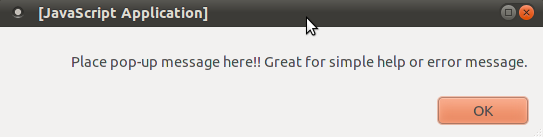
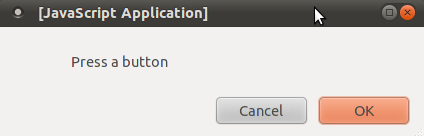
- confirm():
Note that this example uses the alert() dialog box to display the results from the confirm() dialog box.
...
<head>
<script type="text/javascript">
function confirm_dialog()
{
  var rs=confirm("Press a button");
  if (rs==true)
  {
    alert("You pressed OK!");
  }
  else
  {
    alert("You pressed Cancel!");
  }
}
</script>
</head>
<body>
...
...
<form>
    <input name=but2 onclick="confirm_dialog();"
              type=button value="Click to display the confirm message" />
</form>
...
...
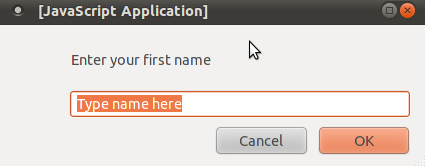
- prompt():
Note that this example uses the alert() dialog box to display the results from the confirm() dialog box.
...
<head>
<script type="text/javascript">
function prompt_dialog()
{
  var rs=prompt("Enter your first name","Type name here");
  if (rs!=null && rs!="")
  {
    alert("Hello " + rs + "! How are you today?");
  }
}
</script>
</head>
<body>
...
...
<form>
    <input name=but3 onclick="prompt_dialog();"
              type=button value="Click to display the prompt message box" />
</form>
...
...
- alert():
- Pop-up a box:
<head> <script language = JavaScript> function js_menu(file,d){ if( parseInt(navigator.appVersion) < 4){ return true; } l = document.layers['popup']; text="<table border><td>item1 <a href=\"/xxx/"+file+"\">"+file+"</a><br>item2 <a href=\"/cgi-bin/doc?/xxx"+file+"\">"+file+"</a></td></tr></table>" l.document.write(text); l.top = d.target.y; l.left = d.target.x + 50; if( (l.left + l.clipWidth) > window.width ) { l.left = window.width - l.clipWidth; } l.document.close(); return false; } // end script --> </script> <layer name="popup" onMouseOut="this.visibility='hide';" left=0 top=0 bgcolor="#dddddd" visibility="hide"> </layer> </head> <body> <a href="xxx.html" onMouseOver="return js_menu('xxx.c',event)">xxx</A> </body> - Javascript to preload images for faster loading on later pages:
Use of the image Image-Name-1.gif in subsequent pages will be loaded from chache.
<script language = JavaScript> if (document.images) { img1 = new Image(); img2 = new Image(); img1.src = "Image-Name-1.gif"; img2.src = "Image-Name-2.gif" } </script> - Javascript to open a new window. Placed in an email it
will open the browser to a given page and destination when the email is
opened:
<html> <head> <script language=JavaScript> function openSite() { location.href = "http://www.yolinux.com"; } </script> </head> <body bgcolor=FFFFFF onLoad="openSite()"> Bla Bla Bla </body> </html> - Javascript functions available with the default class:
- Print page:
<form name="XForm"> <input type="button" value="Print" onClick="self.print()"> </form> - Print page but check to make sure it has fully loaded first:
<html> <head> <script language="JavaScript"> var doneLoading = false; function printPage() { if(doneLoading) { window.print(); } else { alert('Page is not done loading yet! Please wait and try again.') } } function finishLoading() { doneLoading=true; } </script> </head> <body> .. ... <a href="javascript:printPage()"><img alt="Print Page" src="images/button-image.gif" border="0"></a> </body> </html> ... .. - Print page (2nd method):
<a href="javascript:window.print();"><img src="images/buttonImage.gif"></a> - Close page:
<form name="YForm">
    <input type="button" value="Close" onClick="self.close()">
</form>
- Print page:
- Javascript to print current date:
<script language="JavaScript">
var stampmonths = new Array(
"January","February","March","April","May","June","July","August","September","October","November","December");

var thedate = new Date();

document.write(stampmonths[ thedate.getMonth()] + " " + thedate.getDate() + ", " +   thedate.getFullYear());

</script>
Note: the date comes from users computer and not the server. Server date can be posted using an Apache SSI (Server Side Include)<!--#echo var="DATE_LOCAL" -->or specify format:<!--#config timefmt="%A %B %d, %Y" --> Today is <!--#echo var="DATE_LOCAL" -->Time/Date format codes - Javascript to Scroll message at bottom of browser:
Place in "HEAD" section of HTML page.<script> <!-- var scrmsg = " YoLinux.com: Web Tips and Tricks "; var scrspacer = " "; var scrpos = 0; function ScrollMessage() { window.status = scrmsg.substring(scrpos, scrmsg.length) + scrspacer + scrmsg.substring(0,scrpos); scrpos++; if (scrpos > scrmsg.length) scrpos = 0; window.setTimeout("ScrollMessage()", 150); } ScrollMessage(); //--> </script> - Javascript to Scroll message title at top of browser window:
Place in "HEAD" section of HTML page.<script> <!-- var msg = " YoLinux.com: Web Tips and Tricks. -- Top of Page -- "; var speed=200; function ScrollTitle() { document.title=msg; msg=msg.substring(1,msg.length)+msg.charAt(0); setTimeout("ScrollTitle()",speed); } ScrollTitle(); //--> </script> - Javascript functions pulled from server: (not embeded in page)
The portion of the javascript code which is emebeded in the "body" of the page which calls the javascript function must still be present. This is just one method of reducing duplication among pages.<head> <script type="test/javascript" language="javascript" src="http://file.js"> </script> </head> ... - jsMath: Javascript for the printing of mathematics symbols on a web page:
This is the holy grail for the publishing of mathematics formulas with Jvascript. Also see the HTML solution above.
See the jsMath home page.
Also look at: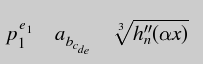
Javascript resources:
- JavaScript.com
- JavaScript Tutorial for Programmers - Aaron Weiss
- Simile Widgets - visualization widgets
- HtmlGoodies.com - JavaScript Tutorials and samples
- Elated.com: Javascript tutorials
Javascript Frameworks, Libraries and APIs:
- JQuery - HTML DOM access, use and traversal for manipulation, event handling, AJAX and animation. Very popular on the web
- JQuery GEO - geospatial mapping, map display
- Supersized - full screen slide show
- CoverVid - HTML5 full screen video background. (Also see BeachFrontBRoll.com)
- BigVideo.JS big background video (and images)
- D3js - data and geo related display
- AngularJS - for generation of dynamic interactive web pages
- Intense Images - image viewing
- WebGL 3D Javascript:
- Page and site tour:
Sound can enhance the user experience of your web page. Browsers do not natively support sound and require helper applications. (See the YoLinux tutorial on configuring the Mozilla/Firefox browser.) Not all browsers support sound equally as JavaScript and player support vary from platform to platform. Midi files with complex arrangements of many different types of instruments will vary based on the sound card support of the instruments referenced and arrangement support. Sound loops are measured in beats per minute (bpm). Flash often uses 120 bpm to syncronize with the frame rates of the flash presentation.
- Add sound/music to a page:
- <embed src="sound-file.mp3" width="0" height="0" autostart=true>
- <embed src="sound-file.mid" width=2 height=0 autostart=true loop=true>
- Set loop="true" to play the sound over and over continuously.
- Set autostart="true" to begin playback of the sound file.
- <embed src="sound-file.wav" hidden="true" autostart="false" loop="false" name="referenceNameOfSoundFile" />
- The "referenceNameOfSoundFile" is optional and allows reference by JavaScript.
- Set hidden="false" to allow user to view sound controls.
- Set loop="false" to play the sound file once only.
- Set autostart="false" halts playback of the sound file until told otherwise.
- <embed src=sound-file.swf quality=high
pluginspage=http://www.macromedia.com/shockwave/download/index.cgi?P1_Prod_Version=ShockwaveFlash
type=application/x-shockwave-flash 5>
(Used on this page)
AJAX (Asynchronous JavaScript and XML) is a web technique which uses XML/HTML http requests to exchange data with the web server and dynamically insert it into a loaded web page or in an IFRAME. Javascript code running in the browser communicates with the server by passing XML formatted data. The result is a seemingly dynamic application running within your web browser. AJAX is supported by most modern browsers (Mozilla/Firefox 1.0+, IE 5.0+, ...)
Developer Toolkits: (Commercial)
- Backbase.com - Also good demos.
- JackBe
- Sun Java Studio Creator
- Ruby on Rails - Open Source
Links:
- WikiPedia.org explanation and links
- IBM developerworks 6 part tutorial:
- YoLinux list of AJAX based office suites and applications
- Bindows - AJAX API for creating dynamic web applications.
Javascript Frameworks: (dynamic, interactive, Ajax web pages)
- jQuery
- MooTools
- PrototypeJs
- Angular JS - Google HTML/typescript framework
- React - Facebook javascript framework
The connection/transfer protocol the web browser uses with the web server is HTTP. This protocol is a plain text set of instructions issued to a web server using a regular sockets TCP/IP connection typically using port 80.
- One can make this connection using a telnet session.
telnet www.web-site-domain.com 80
Once connected issue the HTTP commands. - Command to retrieve the default home page:
GET / HTTP/1.1
Then press carraige return twice. - Sometimes it may be necessary to enter the host name when virtual hosting is enabled:
   GET / HTTP/1.1
Host: www.web-site-domain.com - To recieve a specific page:
GET /web-page2.html HTTP/1.1
See RFC 2068 for Hypertext Transfer Protocol -- HTTP/1.1 for a full list of commands and details about the protocol.
Why would we ever do such a thing?? When you "View" + "Page Source" in the Netscape browser, you will see the page source after the Javascript is processed. In order to see the original Javascript, connect with a telnet session to download the full source of the web page.
The Linux RPM package perl-libwww-perl provides a set of perl command scripts which acts as a WWW user agent. The above telnet interactions to issue http requests are available by issuing a single command:
| Command | Description |
|---|---|
| /usr/bin/GET | Send http "GET" request to web server. user/password is requested if the document is password protected. example: GET http://www.yolinux.com/TUTORIALS/index.html Also see the command wget |
| /usr/bin/HEAD | Send http "HEAD" request to web server. Display response header. example: HEAD http://www.yolinux.com Also: curl -I url |
| /usr/bin/POST | Send http "POST content" request to web server. Use command option "-c application/x-www-form-urlencoded" (default) or "-c text/plain" to specify mime type of the content. |
Command format: LWP-COMMAND -t 1m -p proxy.megacorp.com -C user1:super-secret-password -s http://url/content-requested
| Command line options | Description |
|---|---|
| -t time | Set timeout period. Default period is seeconds. m: minutes, h: hours |
| -c content-type | Set mime type. Default for POST: application/x-www-form-urlencoded, GET: -c text/plain |
| -p proxy | Set the proxy to be used for the requests. |
| -P | Disable proxy set by environment. |
| -H | Set http header. i.e. -H 'Referer: http://url-specified/' |
| -C user-name:password | Set login/password to access protected page. |
| -s | Print response status code. |
| -h | Print usage message and quit. |
| -x | Extra debugging output. |
| -o format | Specify format type: text, ps, links, html, dump |
| -h | code. |
Links:
- lwp-request - Man page
- wget - Man page
Google has a Javascript map API (V3) which anyone can use on their web site to embed maps and geographic information in a web page.
- The Google Maps API for all platforms and Maps API product descriptions
- Registration instructions.
- Google maps developer docs (basic setup information)
- map types
There are two methods of supporting a comments section at the bottom of a web page: (1) add the dynamic content/cgi framework to an existing framework or as a server side include or (2) add javascript which interfaces with a server based framework and persistent storage. This is typically available as a service by a third party.
Dynamic content: (code)- PhpJabbers - PHP/MySQL based comments script (commercial service)
- Gentlesource.com - PHP based. Commercial service for any PHP or HTML based page.
- Cubescript - commercially sold script
- JsWidget.com - BSD license PHP, jQuery plugin, XML but no database. Bubble graphics and discussion threads.
- Commentics.org - FOSS, PHP/MySQL based
- EasyPageComments - nice indented graphics, integrates with SQLite, PHP or Javascript and html.
- ScriptsMill - SSI or PHP. Supports voting
Features include CAPTCHA, IP blocking and other anti-comment spam techniques, support for emoticons, social links, bad word filters, comment moderation and administration, email notifications, pagination (long discussions), comment threads, statistics, ...
- Adobe Flash Player
- Gnash - Gnu GPL Flash player
- Spalah - GPL Flash composer
- Flash for Linux - GPL Flash composer
- SWIFT - See Swift-Generator tool to build Flash presentations. (Platforms include Linux)
- Elated.com: Webmaster Tutorials
- AnyChart.com - Flash applet to recieve XML feed and display Gant charts, maps or charts in your web page.
- URL for email: HTML "mailto"
<a href="mailto:user1@megacorp.com?subject=email subject goes here&body=Text to go into body of email goes here">Link text or image goes here</a> - Images as attachments VS inline:
Inline image: Photo will appear with the e-mail.
Content-Type: multipart/mixed; boundary="0-298722514-978806636=:69282"
X-Mozilla-Status: 8001
X-Mozilla-Status2: 00000000
X-UIDL: 4445764339010e00

--0-298722514-978806636=:69282
Content-Type: text/plain; charset=us-ascii
Content-Disposition: inline

Bla Bla Bla...

--0-298722514-978806636=:69282
Content-Type: image/pjpeg; name="photo1 jan 5.jpg"
Content-Transfer-Encoding: base64
Content-Description: photo1 jan 5.jpg
Content-Disposition: inline; filename="photo1 jan 5.jpg"

/9j/4AAQSkZJRgABAgEASABIAAD/7QxiU....
..
...
 -- UU encoded photo --
...
..
oJgefw/CftBseNkAt1Cyitb97cTrcRLx/wBJT7J+Hl/zZgFsfShrqGOGZ442
EiL9mQd8kLV//9k=

--0-298722514-978806636=:69282--
Attachement image: Photo will be an attachement. (2 images)
Subject: Talya and Sigal Update
Date: Sat, 6 Jan 2001 11:09:50 -0600
MIME-Version: 1.0
Content-Type: multipart/mixed;
        boundary="----=_NextPart_000_0042_01C077D1.2FD60800"
X-Priority: 3
X-MSMail-Priority: Normal
X-Mailer: Microsoft Outlook Express 5.00.2014.211
X-MimeOLE: Produced By Microsoft MimeOLE V5.00.2014.211
X-Mozilla-Status: 8001
X-Mozilla-Status2: 00000000
X-UIDL: e54355e3ad7b0700

This is a multi-part message in MIME format.

------=_NextPart_000_0042_01C077D1.2FD60800
Content-Type: text/plain;
        charset="iso-8859-1"
Content-Transfer-Encoding: 7bit

Hi Everyone, Bla Bla Bla ...


------=_NextPart_000_0042_01C077D1.2FD60800
Content-Type: image/jpeg;
        name="t&s1223.jpg"
Content-Transfer-Encoding: base64
Content-Disposition: attachment;
        filename="t&s1223.jpg"

/9j/2wCEAAQDAwMDAwQDAwQGBAMEBgcFBAQFBwgGBgcGBggKCAkJCQkICgoMDAwMDAoMDA0NDAwR
ERERERQUFBQUFBQUFBQBBAUFCA...
..
...
 -- UU encoded photo --
...
..
0se/MNgni1J9J4Zea6y1GzCxWWowfDHtDNIebB+xbtmIeE3S5dJPGAbtNbTTri4hnvFmjSKI8fTc
hSabkiu2UI4R05ph+lJf0WYqtyBCVp+ya98lxGqcXwxx2//Z

------=_NextPart_000_0042_01C077D1.2FD60800
Content-Type: image/jpeg;
        name="fireplace1222.jpg"
Content-Transfer-Encoding: base64
Content-Disposition: attachment;
        filename="fireplace1222.jpg"

/9j/2wCEAAQDAwMDAwQDAwQGBAMEBgcFBAQFBwgGBg...
...
..
.
NWL5W6DSeN+XlXLiHFXP+xi2mjWfXj/QBHqem9aiLjSorz5H7Xz+jOdyfX1cvJf8VpJr1Dej9KiB
ZP8AdnpEMedN6/ZWtPDL/wCHycrFVefm/wD/2Q==

------=_NextPart_000_0042_01C077D1.2FD60800--
- Web Monkey - Web developer's site
- Web developer resources
- Classify.org - Rating and classifications systems for web pages to protect children from adult content.
- HtmlHelp.com - Web Design Group
- weblint
- Netscape RGB color palette
- W3: HTML 4.0
- W3: CSS1 - [Positioning]
- Computer Arts Magazine - Photoshop, Flash artwork magazine
- LinkPopularity.com - Find sites linked to yours
- Web page translation service - Internationalization
- Web site usability study and findings
YoLinux list of e-Commerce Payment Services and credit card processors.
Browser plug-in detection:
- BrowserSpy - check what information is possible to gather from your system, just by visiting a website.
Web Professional Associations:

